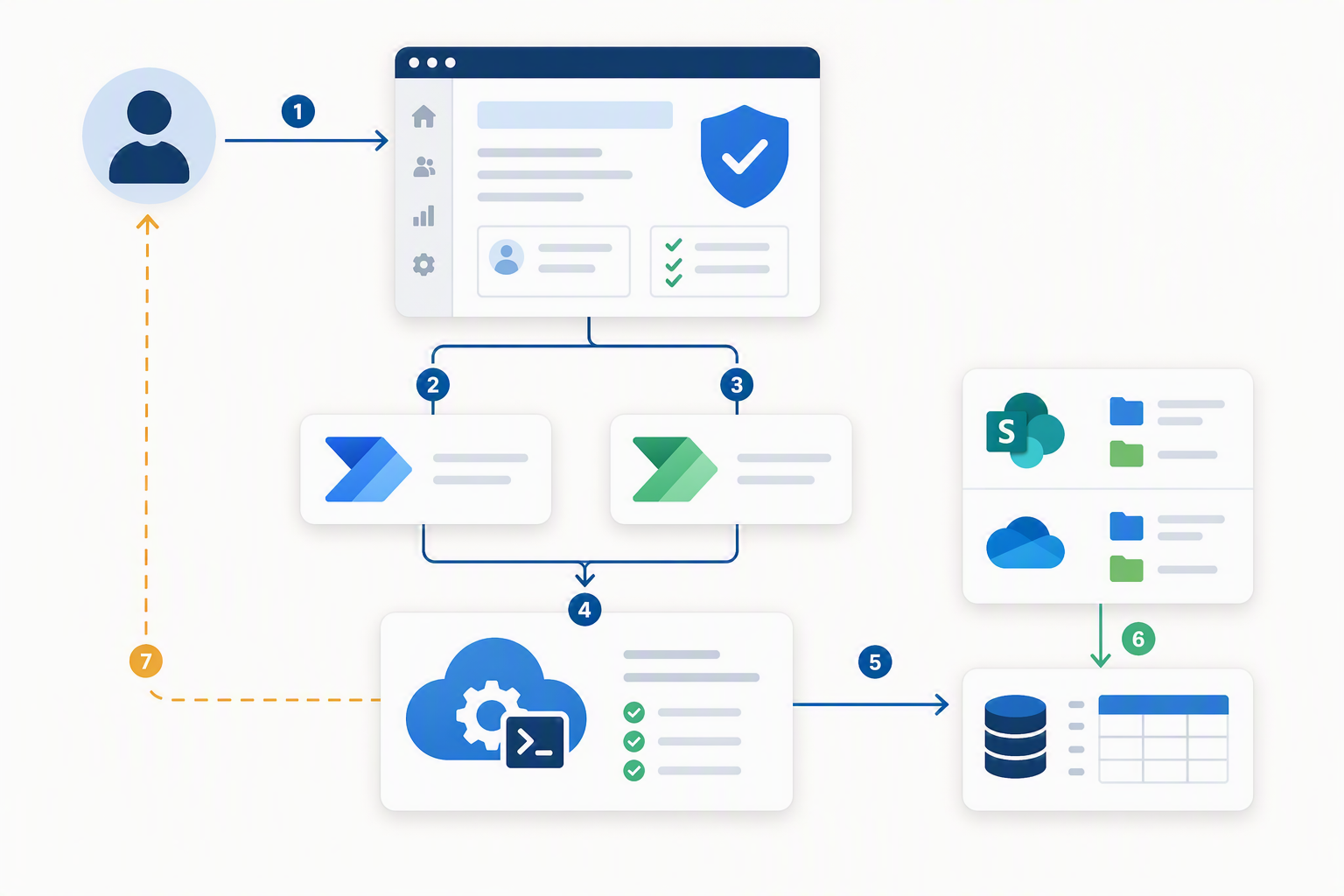
If you run an M365 environment, you know the tickets: “Who has access to this site?” and “Does this person have access to that folder?” They arrive constantly, and answering them by hand in the SharePoint UI is slow — worse, the UI hides the real story, because access often flows through nested security groups that the “Check Permissions” button won’t fully expand.
So I built a self-service tool that answers both questions in under a minute, works across sites/subsites/OneDrive/folders/files, and audits every query.
Note: Every identifier in this post is a placeholder. Swap in your own tenant values before using anything here.
What it does
- Two modes:
- Reverse — “Does user X have access to Y?” → a clear ACCESS GRANTED / NO ACCESS verdict plus the effective permission level.
- Forward — “Who has access to Y?” → a list of every principal with access.
- Works on SharePoint sites, subsites, OneDrive, folders, files, and
:f:/r/share links. - Shows effective permissions, the source of access, and can expand security-group members.
- Audits every query (who ran it, what they checked, when, and the result).
Architecture
The interesting part isn’t the enumeration — it’s the handoff. Power Automate flows called from Power Apps have a ~120-second synchronous limit. But a runbook can easily take longer than that (cold starts, large libraries). If the app waits synchronously, it times out.
Key insight: Don’t make the app wait. The Start flow fires the runbook and returns immediately (~2 s). The runbook does the heavy lifting on its own schedule and writes the result to a SharePoint list. The Power App then reads that result directly from the list via a “Show Results” button. No timers, no polling loops, no 120-second timeout.
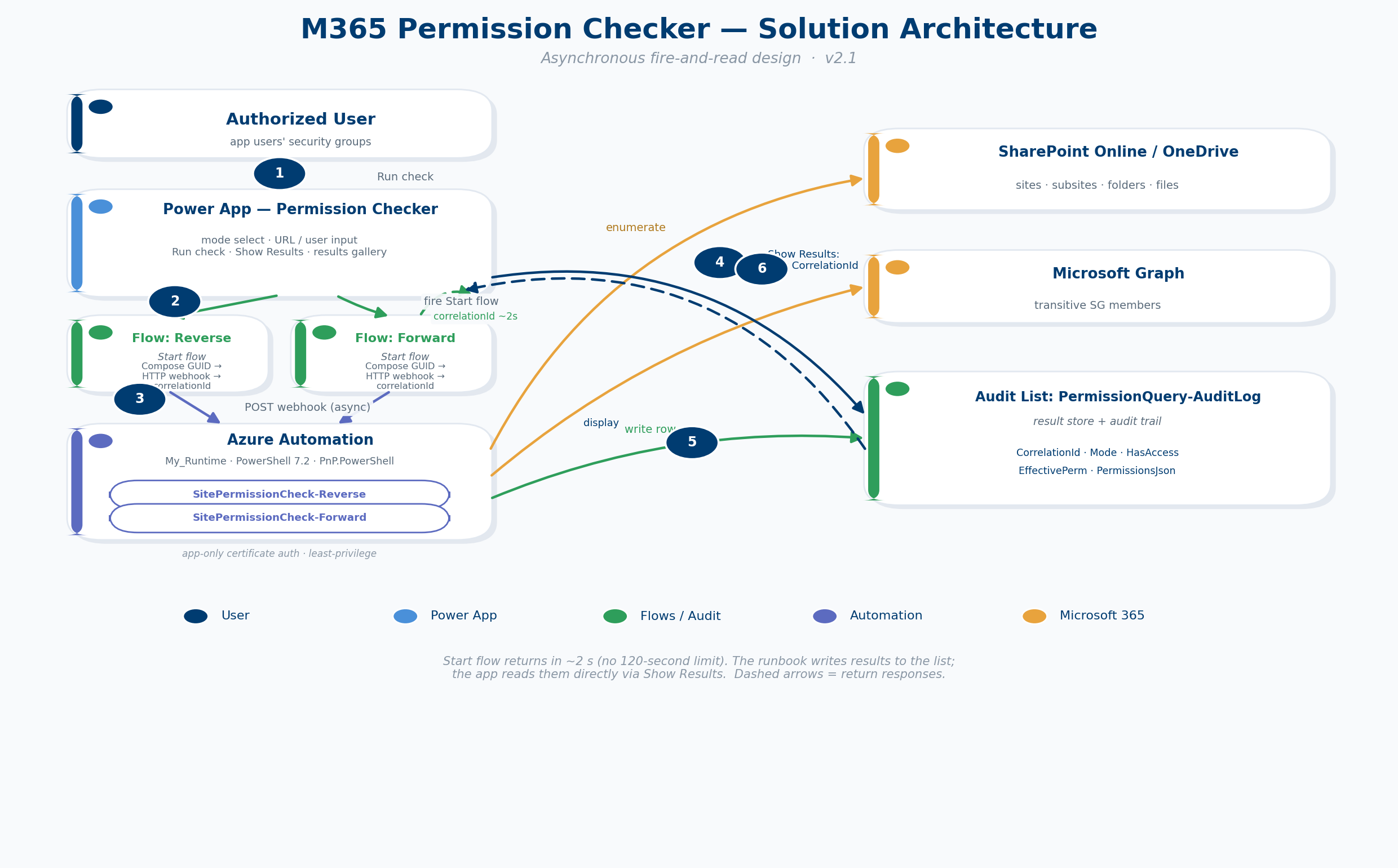
Solution architecture — the Start flow returns in ~2 s; the runbook writes to the audit list; the app reads it back directly.
Data flow:
- User picks a mode, enters a URL (and a UPN for Reverse), and clicks Run check.
- The Power App calls the matching Start flow.
- The Start flow generates a
correlationId, POSTs the runbook webhook (async), and responds with the correlationId (~2 s). - The runbook connects via certificate (app-only) auth and enumerates permissions.
- The runbook writes one row to the audit list — tagged with that
correlationId. - The user clicks Show Results; the app reads the row by
correlationId. - The app displays the verdict (Reverse) or fills a results gallery (Forward).
Components
| Component | Purpose |
|---|---|
| Power App (canvas) | End-user UI: mode select, inputs, Run check, Show Results, results gallery |
| Start flow × 2 | Fire the runbook webhook and return the correlationId (~2 s) |
| Runbook × 2 | Reverse (one-user effective check) and Forward (enumerate all principals) |
| Automation Account | Hosts the runbooks on a custom PnP.PowerShell runtime |
| App registration + certificate | App-only auth with least-privilege Graph/SPO scopes |
| SharePoint audit list | Result store and audit trail |
| Access groups | Control who can use the app and read the audit list |
The audit list schema
| Column | Type |
|---|---|
| RequestorUPN | Single line of text |
| TargetUPN | Single line of text |
| TargetURL | Multiple lines of text |
| TargetURLKey | Single line of text (255) |
| Mode | Choice (Reverse, Forward) |
| HasAccess | Choice (True, False, N/A) |
| EffectivePerm | Multiple lines of text |
| AccessSource | Multiple lines of text |
| PermissionsJson | Multiple lines of text |
| RowCount | Number |
| ErrorMessage | Multiple lines of text |
| JobId | Single line of text (40) |
| CorrelationId | Single line of text (50) |
Setting up app-only auth
The runbooks authenticate as an app registration using a certificate — no user credentials, and least-privilege scopes.
- Create an app registration (e.g.
YourAppRegistration). - Add application API permissions and grant admin consent:
- Microsoft Graph:
Group.Read.All,Directory.Read.All - SharePoint:
Sites.FullControl.All
- Microsoft Graph:
- Generate a certificate and upload the public key to the app registration.
- Add the certificate to the Automation Account certificate store.
A quick self-signed cert for testing:
New-SelfSignedCertificate `
  -Subject "CN=YourAppRegistration" `
  -CertStoreLocation "Cert:\CurrentUser\My" `
  -KeyExportPolicy Exportable -KeySpec Signature `
  -NotAfter (Get-Date).AddYears(2)
The Reverse runbook
It uses EnsureUser + CSOM GetUserEffectivePermissions to get the user’s effective permission mask on the target (site, folder, or file), then walks the site collection admins and SharePoint groups — expanding nested Entra security groups via Graph — to explain why the user has access.
<#
.SYNOPSIS
    Returns effective SharePoint/OneDrive permissions for a given UPN on a
    site, subsite, folder, or file. Writes an audit-log row and returns JSON.

.VERSION
    2.0

.NOTES
    Runtime:    PowerShell 7.2 + PnP.PowerShell 2.12.0
    App reg:    YourAppRegistration
    Cert:       <YOUR_CERT_NAME>
    Audit list: /sites/YourAdminSite/Lists/PermissionQuery-AuditLog
    Author:     Rui Qiu
#>

param(
    [object]$WebhookData,
    [string]$Upn,
    [string]$TargetUrl,
    [string]$RequestorUpn,
    [string]$CorrelationId = ''
)

# ============================================================
#  CONFIGURE THESE FOR YOUR ENVIRONMENT
#  Replace the placeholder values below before running.
# ============================================================
$ScriptVersion = '2.0'
$ErrorActionPreference = 'Stop'

$TenantId  = '<YOUR_TENANT_ID>'
$ClientId  = '<YOUR_APP_CLIENT_ID>'
$CertName  = '<YOUR_CERT_NAME>'
$AuditSite = 'https://yourtenant.sharepoint.com/sites/YourAdminSite'
$AuditList = 'PermissionQuery-AuditLog'

# ---------- diagnostic banner ----------
Write-Output "===== SitePermissionCheck-Reverse v$ScriptVersion ====="
Write-Output "Start (UTC): $((Get-Date).ToUniversalTime().ToString('o'))"
Write-Output "PowerShell:  $($PSVersionTable.PSVersion)"
$pnp = Get-Module -ListAvailable PnP.PowerShell | Select-Object -First 1
if ($pnp) { Write-Output "PnP.PowerShell: $($pnp.Version)" }
else       { Write-Warning "PnP.PowerShell not found on this runtime!" }

# ---------- hydrate params ----------
if ($WebhookData) {
    Write-Output "Invocation: WEBHOOK"
    try {
        $payload       = $WebhookData.RequestBody | ConvertFrom-Json
        $Upn           = $payload.UPN
        $TargetUrl     = $payload.TargetUrl
        $RequestorUpn  = $payload.RequestorUPN
        $CorrelationId = if ($payload.CorrelationId) { [string]$payload.CorrelationId } else { '' }
    } catch {
        throw "Failed to parse webhook body: $($_.Exception.Message)"
    }
} else {
    Write-Output "Invocation: DIRECT"
}

if (-not $Upn)          { throw "Missing required parameter: UPN" }
if (-not $TargetUrl)    { throw "Missing required parameter: TargetUrl" }
if (-not $RequestorUpn) { throw "Missing required parameter: RequestorUPN" }

$Upn           = ($Upn.Trim())           -replace '[\r\n\t]', ''
$TargetUrl     = ($TargetUrl.Trim())     -replace '[\r\n\t]', ''
$RequestorUpn  = ($RequestorUpn.Trim())  -replace '[\r\n\t]', ''
$CorrelationId = ($CorrelationId.Trim()) -replace '[\r\n\t]', ''

Write-Output "Upn:           $Upn"
Write-Output "TargetUrl:     $TargetUrl"
Write-Output "RequestorUpn:  $RequestorUpn"
Write-Output "CorrelationId: $CorrelationId"

# ---------- helpers ----------
function ConvertFrom-UrlEncoded {
    param([string]$Value)
    return [System.Uri]::UnescapeDataString($Value)
}

function Get-SiteUrlFromLink {
    param([string]$Url)
    $normalized = $Url -replace '/:[a-z]+:/r/', '/'

    # OneDrive web UI URL: /my?id=/personal/xxx/...
    if ($normalized -match '^(https://[^/]+)/my\?') {
        $hostPart = $Matches[1]
        if ($normalized -match '[?&]id=([^&]+)') {
            $decodedPath = ConvertFrom-UrlEncoded -Value $Matches[1]
            if ($decodedPath -match '^(/personal/[^/]+)') {
                return $hostPart + $Matches[1]
            }
        }
        throw "This is a OneDrive root link with no folder path. Navigate INTO a folder first, then copy the URL (it should contain 'id=/personal/...')."
    }

    $clean   = ($normalized -split '#')[0]
    $clean   = ($clean -split '\?')[0]
    $decoded = ConvertFrom-UrlEncoded -Value $clean

    # Split site from content at the library-name boundary (subsite-aware)
    if ($decoded -match '^(https://[^/]+/(?:sites|teams)/.+?)/(Shared Documents|Documents)(/|$)') {
        return $Matches[1]
    }
    if ($decoded -match '^(https://[^/]+/personal/[^/]+)/(Documents)(/|$)') {
        return $Matches[1]
    }

    # No library segment -> entire path is a site/subsite URL
    if ($decoded -match '^(https://[^/]+/(?:sites|teams)/.+?)(/(?:SitePages|Forms|Lists|_layouts)/.*)?$') {
        return $Matches[1].TrimEnd('/')
    }
    if ($decoded -match '^(https://[^/]+/personal/[^/?#]+)')  { return $Matches[1] }
    if ($decoded -match '^(https://[^/]+)/?$')                { return $Matches[1] }
    throw "Cannot parse site URL from: $Url"
}

function Get-ServerRelativePath {
    param([string]$Url)
    if ($Url -match '/my\?') {
        if ($Url -match '[?&]id=([^&]+)') {
            return ConvertFrom-UrlEncoded -Value $Matches[1]
        }
    }
    $normalized = $Url -replace '/:[a-z]+:/r/', '/'
    $clean = ($normalized -split '#')[0]
    $clean = ($clean -split '\?')[0]
    $decoded = ConvertFrom-UrlEncoded -Value $clean
    if ($decoded -match '^https://[^/]+(/.*)$') { return $Matches[1] }
    return $null
}

function Get-RelativeToSite {
    param([string]$FullPath, [string]$SitePath)
    if (-not $FullPath -or -not $SitePath) { return '' }
    if ($FullPath.ToLower().StartsWith($SitePath.ToLower())) {
        return $FullPath.Substring($SitePath.Length)
    }
    return $FullPath
}

function Get-CertThumbprint {
    $c = Get-AutomationCertificate -Name $CertName
    if (-not $c) { throw "Cert '$CertName' not found." }
    return $c.Thumbprint
}

function Connect-Site {
    param([string]$Url)
    try { Disconnect-PnPOnline -ErrorAction SilentlyContinue } catch { }
    Connect-PnPOnline -Url $Url -ClientId $ClientId -Tenant $TenantId `
        -Thumbprint (Get-CertThumbprint)
}

function Write-Audit {
    param([hashtable]$Values)
    try {
        Connect-Site -Url $AuditSite
        Add-PnPListItem -List $AuditList -Values $Values | Out-Null
        Write-Output "Audit row written."
    } catch {
        Write-Warning "Audit write failed: $($_.Exception.Message)"
    }
}

function Get-UpnFromClaims {
    param([string]$LoginName)
    if (-not $LoginName) { return '' }
    $last = ($LoginName -split '\|')[-1]
    $clean = ($last -split '_')[0]
    return $clean
}

# ---------- main ----------
$result = [ordered]@{
    upn            = $Upn
    targetUrl      = $TargetUrl
    siteUrl        = $null
    isItemLevel    = $false
    hasAccess      = $false
    effectivePerm  = 'None'
    accessSource   = @()
    checkedAt      = (Get-Date).ToUniversalTime().ToString('o')
    scriptVersion  = $ScriptVersion
    correlationId  = $CorrelationId
    error          = $null
}

try {
    $siteUrl        = Get-SiteUrlFromLink -Url $TargetUrl
    $result.siteUrl = $siteUrl
    Write-Output "Resolved site: $siteUrl"

    Connect-Site -Url $siteUrl

    # ---- Determine if item-level ----
    $serverRelPath = Get-ServerRelativePath -Url $TargetUrl
    $siteUri  = [System.Uri]$siteUrl
    $sitePath = $siteUri.AbsolutePath
    $isItemLink = $false
    if ($serverRelPath -and $serverRelPath -ne $sitePath -and $serverRelPath -ne "$sitePath/") {
        $rel = Get-RelativeToSite -FullPath $serverRelPath -SitePath $sitePath
        $relTrim = $rel.TrimEnd('/')
        if ($relTrim -and $relTrim -ne '' -and `
            $relTrim -ne '/Documents' -and `
            $relTrim -ne '/Shared Documents') {
            $isItemLink = $true
        }
    }
    $result.isItemLevel = $isItemLink

    # ---- Effective permissions using CSOM ----
    try {
        $ctx = Get-PnPContext
        $web = $ctx.Web
        $ctx.Load($web)
        $ctx.ExecuteQuery()

        $ensuredUser = $null
        try {
            $ensuredUser = $web.EnsureUser($Upn)
            $ctx.Load($ensuredUser)
            $ctx.ExecuteQuery()
            Write-Output "User ensured: $($ensuredUser.LoginName)"
        } catch {
            Write-Warning "EnsureUser failed for '$Upn': $($_.Exception.Message)"
            $result.effectivePerm = 'User not found in tenant'
            $result.hasAccess = $false
            throw
        }

        $loginName = $ensuredUser.LoginName

        if ($isItemLink) {
            Write-Output "Item-level check requested for: $serverRelPath"
            $file = Get-PnPFile -Url $serverRelPath -AsListItem -ErrorAction SilentlyContinue
            $folder = $null
            if (-not $file) {
                $folder = Get-PnPFolder -Url $serverRelPath -ErrorAction SilentlyContinue
            }

            if ($file) {
                Write-Output "Resolved as file."
                $ctx.Load($file)
                $ctx.ExecuteQuery()
                $permResult = $file.GetUserEffectivePermissions($loginName)
                $ctx.ExecuteQuery()
                $mask = $permResult.Value
            } elseif ($folder) {
                Write-Output "Resolved as folder."
                $folderItem = $folder.ListItemAllFields
                $ctx.Load($folderItem)
                $ctx.ExecuteQuery()
                $permResult = $folderItem.GetUserEffectivePermissions($loginName)
                $ctx.ExecuteQuery()
                $mask = $permResult.Value
            } else {
                Write-Warning "Item not resolvable; falling back to site-level check."
                $permResult = $web.GetUserEffectivePermissions($loginName)
                $ctx.ExecuteQuery()
                $mask = $permResult.Value
            }
        } else {
            $permResult = $web.GetUserEffectivePermissions($loginName)
            $ctx.ExecuteQuery()
            $mask = $permResult.Value
        }

        $permKindType = [Microsoft.SharePoint.Client.PermissionKind]
        $permNames = @()
        if ($mask.Has($permKindType::FullMask))     { $permNames += 'FullControl' }
        if ($mask.Has($permKindType::ManageWeb))     { $permNames += 'ManageWeb' }
        if ($mask.Has($permKindType::EditListItems)) { $permNames += 'Edit' }
        if ($mask.Has($permKindType::AddListItems))  { $permNames += 'Add' }
        if ($mask.Has($permKindType::ViewListItems)) { $permNames += 'View' }
        if ($mask.Has($permKindType::Open))          { $permNames += 'Open' }

        $result.effectivePerm = if ($permNames.Count -gt 0) { $permNames -join ', ' } else { 'None' }
        $result.hasAccess     = $permNames.Count -gt 0
    }
    catch {
        if ($result.effectivePerm -eq 'None') { $result.effectivePerm = 'Error' }
        Write-Warning "Effective permission check failed: $($_.Exception.Message)"
        $result.hasAccess = $false
    }

    # ---- Explain WHY ----
    $sources = @()
    $upnLower = $Upn.ToLower()

    try {
        foreach ($sca in (Get-PnPSiteCollectionAdmin)) {
            $scaId = Get-UpnFromClaims -LoginName $sca.LoginName
            if ($scaId.ToLower() -eq $upnLower) {
                $sources += 'Site Collection Administrator'
            }
        }
    } catch { Write-Warning "SCA enumeration failed: $($_.Exception.Message)" }

    $token = $null
    try { $token = Get-PnPGraphAccessToken } catch { Write-Warning "No Graph token." }

    try {
        foreach ($g in (Get-PnPGroup)) {
            if ($g.Title -match '^SharingLinks\.' -or `
                $g.Title -match '^Limited Access System Group' -or `
                $g.Title -eq 'Everyone' -or `
                $g.Title -eq 'Everyone except external users') {
                continue
            }
            try {
                $members = Get-PnPGroupMember -Identity $g.Title
            } catch { continue }
            foreach ($m in $members) {
                $memberId = Get-UpnFromClaims -LoginName $m.LoginName
                if ($memberId.ToLower() -eq $upnLower) {
                    $sources += "Direct in SP group '$($g.Title)'"
                    continue
                }
                if ($m.PrincipalType -eq 'SecurityGroup' -and $token) {
                    $sgId = Get-UpnFromClaims -LoginName $m.LoginName
                    try {
                        $graphUri = "https://graph.microsoft.com/v1.0/groups/$sgId/transitiveMembers?" + `
                                    '$select=userPrincipalName&$top=999'
                        $r = Invoke-RestMethod -Headers @{ Authorization = "Bearer $token" } -Uri $graphUri
                        if ($r.value.userPrincipalName -contains $Upn) {
                            $sources += "Via Entra SG '$($m.Title)' -> SP group '$($g.Title)'"
                        }
                    } catch { }
                }
            }
        }
    } catch { Write-Warning "SP group walk failed: $($_.Exception.Message)" }

    $result.accessSource = $sources
    Write-Output ("Access sources found: {0}" -f $sources.Count)
}
catch {
    $result.error = $_.Exception.Message
    Write-Warning "Permission check failed: $($_.Exception.Message)"
}

# ---------- audit ----------
$safeUrl    = $TargetUrl
$safeUrlKey = if ($TargetUrl.Length -gt 255) { $TargetUrl.Substring(0, 255) } else { $TargetUrl }

$hasAccessValue = if ($result.error) { 'N/A' } `
                  elseif ($result.hasAccess) { 'True' } `
                  else { 'False' }

$jobIdValue = if ($PSPrivateMetadata.JobId) { $PSPrivateMetadata.JobId.Guid } else { '' }

Write-Audit -Values @{
    Title         = "$RequestorUpn checked $Upn"
    RequestorUPN  = $RequestorUpn
    TargetUPN     = $Upn
    TargetURL     = $safeUrl
    TargetURLKey  = $safeUrlKey
    Mode          = 'Reverse'
    HasAccess     = $hasAccessValue
    EffectivePerm = $result.effectivePerm
    AccessSource  = ($result.accessSource -join '; ')
    ErrorMessage  = $result.error
    JobId         = $jobIdValue
    CorrelationId = $CorrelationId
}

# ---------- output ----------
$json = $result | ConvertTo-Json -Depth 5
Write-Output "===== RESULT JSON ====="
Write-Output $json
The Forward runbook
It enumerates site collection admins, SharePoint groups (with optional transitive member expansion), and broken-inheritance items. It also handles subsites and folder/file-scoped queries.
Performance lesson: The first version checked
HasUniqueRoleAssignmentswith aGet-PnPPropertycall per item — that took ~22 minutes on a large library. Switching to a bulk CAML query that returnsHasUniqueRoleAssignmentsfor all items in paged batches cut it to ~30 seconds. One call for 500 items beats 500 calls for 500 items.
<#
.SYNOPSIS
    Enumerates permissions on a SharePoint/OneDrive site, subsite, folder, or file.

.VERSION
    2.0

.NOTES
    Runtime:    PowerShell 7.2 + PnP.PowerShell 2.12.0
    App reg:    YourAppRegistration
    Cert:       <YOUR_CERT_NAME>
    Audit list: /sites/YourAdminSite/Lists/PermissionQuery-AuditLog
    Author:    Rui Qiu
#>

param(
    [object]$WebhookData,
    [string]$TargetUrl,
    [string]$RequestorUpn,
    [string]$ExpandGroups = 'false',
    [string]$CorrelationId = ''
)

# ============================================================
#  CONFIGURE THESE FOR YOUR ENVIRONMENT
#  Replace the placeholder values below before running.
# ============================================================
$ScriptVersion = '2.0'
$ErrorActionPreference = 'Stop'

$TenantId  = '<YOUR_TENANT_ID>'
$ClientId  = '<YOUR_APP_CLIENT_ID>'
$CertName  = '<YOUR_CERT_NAME>'
$AuditSite = 'https://yourtenant.sharepoint.com/sites/YourAdminSite'
$AuditList = 'PermissionQuery-AuditLog'
$MaxScan   = 2000
$MaxUnique = 25

# ---------- diagnostic banner ----------
Write-Output "===== SitePermissionCheck-Forward v$ScriptVersion ====="
Write-Output "Start (UTC): $((Get-Date).ToUniversalTime().ToString('o'))"
Write-Output "PowerShell:   $($PSVersionTable.PSVersion)"
$pnp = Get-Module -ListAvailable PnP.PowerShell | Select-Object -First 1
if ($pnp) { Write-Output "PnP.PowerShell: $($pnp.Version)" }
else       { Write-Warning "PnP.PowerShell not found!" }

# ---------- hydrate params ----------
if ($WebhookData) {
    Write-Output "Invocation: WEBHOOK"
    try {
        $payload       = $WebhookData.RequestBody | ConvertFrom-Json
        $TargetUrl     = $payload.TargetUrl
        $RequestorUpn  = $payload.RequestorUPN
        $ExpandGroups  = if ($payload.ExpandGroups) { [string]$payload.ExpandGroups } else { 'false' }
        $CorrelationId = if ($payload.CorrelationId) { [string]$payload.CorrelationId } else { '' }
    } catch {
        throw "Failed to parse webhook body: $($_.Exception.Message)"
    }
} else {
    Write-Output "Invocation: DIRECT"
}

if (-not $TargetUrl)    { throw "Missing required parameter: TargetUrl" }
if (-not $RequestorUpn) { throw "Missing required parameter: RequestorUPN" }

$TargetUrl     = ($TargetUrl.Trim())     -replace '[\r\n\t]', ''
$RequestorUpn  = ($RequestorUpn.Trim())  -replace '[\r\n\t]', ''
$CorrelationId = ($CorrelationId.Trim()) -replace '[\r\n\t]', ''
$doExpand      = $ExpandGroups -eq 'true'

Write-Output "TargetUrl:     $TargetUrl"
Write-Output "RequestorUpn:  $RequestorUpn"
Write-Output "ExpandGroups:  $doExpand"
Write-Output "CorrelationId: $CorrelationId"

# ---------- helpers ----------
function ConvertFrom-UrlEncoded {
    param([string]$Value)
    return [System.Uri]::UnescapeDataString($Value)
}

function Get-SiteUrlFromLink {
    param([string]$Url)
    $normalized = $Url -replace '/:[a-z]+:/r/', '/'

    if ($normalized -match '^(https://[^/]+)/my\?') {
        $hostPart = $Matches[1]
        if ($normalized -match '[?&]id=([^&]+)') {
            $decodedPath = ConvertFrom-UrlEncoded -Value $Matches[1]
            if ($decodedPath -match '^(/personal/[^/]+)') {
                return $hostPart + $Matches[1]
            }
        }
        throw "This is a OneDrive root link with no folder path. Navigate INTO a folder first, then copy the URL (it should contain 'id=/personal/...')."
    }

    $clean   = ($normalized -split '#')[0]
    $clean   = ($clean -split '\?')[0]
    $decoded = ConvertFrom-UrlEncoded -Value $clean

    if ($decoded -match '^(https://[^/]+/(?:sites|teams)/.+?)/(Shared Documents|Documents)(/|$)') {
        return $Matches[1]
    }
    if ($decoded -match '^(https://[^/]+/personal/[^/]+)/(Documents)(/|$)') {
        return $Matches[1]
    }

    if ($decoded -match '^(https://[^/]+/(?:sites|teams)/.+?)(/(?:SitePages|Forms|Lists|_layouts)/.*)?$') {
        return $Matches[1].TrimEnd('/')
    }
    if ($decoded -match '^(https://[^/]+/personal/[^/?#]+)')  { return $Matches[1] }
    if ($decoded -match '^(https://[^/]+)/?$')                { return $Matches[1] }
    throw "Cannot parse site URL from: $Url"
}

function Get-ServerRelativePath {
    param([string]$Url)
    if ($Url -match '/my\?') {
        if ($Url -match '[?&]id=([^&]+)') {
            return ConvertFrom-UrlEncoded -Value $Matches[1]
        }
    }
    $normalized = $Url -replace '/:[a-z]+:/r/', '/'
    $clean = ($normalized -split '#')[0]
    $clean = ($clean -split '\?')[0]
    $decoded = ConvertFrom-UrlEncoded -Value $clean
    if ($decoded -match '^https://[^/]+(/.*)$') { return $Matches[1] }
    return $null
}

function Get-RelativeToSite {
    param([string]$FullPath, [string]$SitePath)
    if (-not $FullPath -or -not $SitePath) { return '' }
    if ($FullPath.ToLower().StartsWith($SitePath.ToLower())) {
        return $FullPath.Substring($SitePath.Length)
    }
    return $FullPath
}

function Get-CertThumbprint {
    $c = Get-AutomationCertificate -Name $CertName
    if (-not $c) { throw "Cert '$CertName' not found." }
    return $c.Thumbprint
}

function Connect-Site {
    param([string]$Url)
    try { Disconnect-PnPOnline -ErrorAction SilentlyContinue } catch { }
    Connect-PnPOnline -Url $Url -ClientId $ClientId -Tenant $TenantId `
        -Thumbprint (Get-CertThumbprint)
}

function Write-Audit {
    param([hashtable]$Values)
    try {
        Connect-Site -Url $AuditSite
        Add-PnPListItem -List $AuditList -Values $Values | Out-Null
        Write-Output "Audit row written."
    } catch {
        Write-Warning "Audit write failed: $($_.Exception.Message)"
    }
}

function Get-PrincipalType {
    param($PrincipalType)
    switch ($PrincipalType) {
        'User'            { return 'User' }
        'SecurityGroup'   { return 'EntraSG' }
        'SharePointGroup' { return 'SPGroup' }
        default           { return 'Unknown' }
    }
}

function Test-SkipGroup {
    param([string]$GroupTitle)
    if ($GroupTitle -match '^SharingLinks\.') { return $true }
    if ($GroupTitle -match '^Limited Access System Group') { return $true }
    if ($GroupTitle -eq 'Everyone') { return $true }
    if ($GroupTitle -eq 'Everyone except external users') { return $true }
    return $false
}

function Test-PureLimitedAccess {
    param([string]$RoleNames)
    if (-not $RoleNames) { return $true }
    if ($RoleNames -match 'Full Control|Edit|Design|Contribute|Read|ManageWeb') { return $false }
    if ($RoleNames -match 'Limited Access') { return $true }
    return $false
}

function Get-CleanGroupId {
    param([string]$LoginName)
    if (-not $LoginName) { return '' }
    $last = ($LoginName -split '\|')[-1]
    $clean = ($last -split '_')[0]
    return $clean
}

function Add-RoleAssignments {
    param($Securable, [string]$SourceLabel, $RowList)
    $ra = Get-PnPProperty -ClientObject $Securable -Property RoleAssignments
    foreach ($assignment in $ra) {
        Get-PnPProperty -ClientObject $assignment -Property Member, RoleDefinitionBindings | Out-Null
        if (Test-SkipGroup -GroupTitle $assignment.Member.Title) { continue }
        $roleNames = ($assignment.RoleDefinitionBindings | ForEach-Object { $_.Name }) -join ', '
        if (Test-PureLimitedAccess -RoleNames $roleNames) { continue }
        $RowList.Add([pscustomobject]@{
            Principal  = $assignment.Member.Title
            LoginName  = $assignment.Member.LoginName
            Type       = Get-PrincipalType -PrincipalType $assignment.Member.PrincipalType
            Permission = $roleNames
            SPGroup    = $null
            Source     = $SourceLabel
            Members    = @()
        })
    }
}

# ---------- main ----------
$rows       = New-Object System.Collections.Generic.List[object]
$errorMsg   = $null
$siteUrl    = $null
$queryScope = 'SITE-WIDE'

try {
    $siteUrl = Get-SiteUrlFromLink -Url $TargetUrl
    Write-Output "Resolved site: $siteUrl"
    Connect-Site -Url $siteUrl

    # ---- Determine scope ----
    $serverRelPath = Get-ServerRelativePath -Url $TargetUrl
    $siteUri  = [System.Uri]$siteUrl
    $sitePath = $siteUri.AbsolutePath
    $isScoped = $false
    $scopedPath = $null

    if ($serverRelPath) {
        $rel = Get-RelativeToSite -FullPath $serverRelPath -SitePath $sitePath
        $relTrim = $rel.TrimEnd('/')
        if ($relTrim -and $relTrim -ne '' -and `
            $relTrim -ne '/Documents' -and `
            $relTrim -ne '/Shared Documents') {
            $isScoped = $true
            $scopedPath = $serverRelPath
        }
    }
    $queryScope = if ($isScoped) { "FOLDER/FILE-SCOPED: $scopedPath" } else { 'SITE-WIDE' }
    Write-Output "Query scope: $queryScope"

    if (-not $isScoped) {
        # ===================== SITE-WIDE =====================

        # --- 1) SCAs ---
        Write-Output "Enumerating SCAs..."
        try {
            foreach ($sca in (Get-PnPSiteCollectionAdmin)) {
                $rows.Add([pscustomobject]@{
                    Principal  = $sca.Title
                    LoginName  = $sca.LoginName
                    Type       = Get-PrincipalType -PrincipalType $sca.PrincipalType
                    Permission = 'Full Control (SCA)'
                    SPGroup    = $null
                    Source     = 'Site Collection Administrator'
                    Members    = @()
                })
            }
            Write-Output "SCAs added: $($rows.Count)"
        } catch { Write-Warning "SCA enumeration failed: $($_.Exception.Message)" }

        # --- 2) SP groups ---
        Write-Output "Enumerating SP groups..."
        $token = $null
        try { $token = Get-PnPGraphAccessToken } catch { Write-Warning "No Graph token." }

        try {
            foreach ($g in (Get-PnPGroup)) {
                if (Test-SkipGroup -GroupTitle $g.Title) { continue }
                $roleName = 'Unknown'
                try {
                    $perms = Get-PnPGroupPermissions -Identity $g.Title
                    if ($perms) { $roleName = ($perms | Select-Object -First 1).Name }
                } catch { }
                $members = @()
                try { $members = Get-PnPGroupMember -Identity $g.Title } catch { continue }
                foreach ($m in $members) {
                    $typeLabel = Get-PrincipalType -PrincipalType $m.PrincipalType
                    $memberList = @()
                    if ($typeLabel -eq 'EntraSG' -and $doExpand -and $token) {
                        $sgId = Get-CleanGroupId -LoginName $m.LoginName
                        try {
                            $graphUri = "https://graph.microsoft.com/v1.0/groups/$sgId/transitiveMembers?" + `
                                        '$select=displayName,userPrincipalName,accountEnabled&$top=999'
                            $r = Invoke-RestMethod -Headers @{ Authorization = "Bearer $token" } -Uri $graphUri
                            $memberList = $r.value | Where-Object userPrincipalName |
                                Select-Object displayName, userPrincipalName, accountEnabled
                        } catch {
                            Write-Warning "Could not expand SG '$($m.Title)': $($_.Exception.Message)"
                        }
                    }
                    $rows.Add([pscustomobject]@{
                        Principal  = $m.Title
                        LoginName  = $m.LoginName
                        Type       = $typeLabel
                        Permission = $roleName
                        SPGroup    = $g.Title
                        Source     = "Member of SP group '$($g.Title)'"
                        Members    = $memberList
                    })
                }
            }
            Write-Output "Total rows after SP group walk: $($rows.Count)"
        } catch { Write-Warning "SP group walk failed: $($_.Exception.Message)" }

        # --- 3) Broken inheritance (bulk CAML) ---
        Write-Output "Checking broken inheritance in Documents (bulk fetch, cap $MaxUnique unique / $MaxScan scanned)..."
        try {
            $list = Get-PnPList -Identity 'Documents' -Includes HasUniqueRoleAssignments -ErrorAction SilentlyContinue
            if ($list -and $list.HasUniqueRoleAssignments) {
                $camlQuery = @"
<View Scope='RecursiveAll'>
  <ViewFields>
    <FieldRef Name='FileLeafRef'/>
    <FieldRef Name='FileRef'/>
    <FieldRef Name='HasUniqueRoleAssignments'/>
  </ViewFields>
  <RowLimit Paged='TRUE'>500</RowLimit>
</View>
"@
                $allItems = Get-PnPListItem -List $list -Query $camlQuery -ErrorAction SilentlyContinue
                $uniqueItems = @()
                $scanned = 0
                foreach ($it in $allItems) {
                    $scanned++
                    if ($scanned -gt $MaxScan) {
                        Write-Warning "Scan cap reached ($MaxScan items). Some unique-perm items may not be listed."
                        break
                    }
                    if ($it.FieldValues.HasUniqueRoleAssignments -eq $true) {
                        $uniqueItems += $it
                        if ($uniqueItems.Count -ge $MaxUnique) { break }
                    }
                }
                Write-Output "Scanned: $scanned items; unique-perm items found: $($uniqueItems.Count)"

                foreach ($it in $uniqueItems) {
                    $leaf = $it.FieldValues.FileLeafRef
                    $ra = Get-PnPProperty -ClientObject $it -Property RoleAssignments
                    foreach ($r in $ra) {
                        Get-PnPProperty -ClientObject $r -Property Member, RoleDefinitionBindings | Out-Null
                        if (Test-SkipGroup -GroupTitle $r.Member.Title) { continue }
                        $roleNames = ($r.RoleDefinitionBindings.Name -join ', ')
                        if (Test-PureLimitedAccess -RoleNames $roleNames) { continue }
                        $rows.Add([pscustomobject]@{
                            Principal  = $r.Member.Title
                            LoginName  = $r.Member.LoginName
                            Type       = Get-PrincipalType -PrincipalType $r.Member.PrincipalType
                            Permission = $roleNames
                            SPGroup    = $null
                            Source     = "Item-level: /$($list.Title)/$leaf"
                            Members    = @()
                        })
                    }
                }
            }
        } catch { Write-Warning "Broken-inheritance walk failed: $($_.Exception.Message)" }

    } else {
        # ===================== FOLDER/FILE-SCOPED =====================
        Write-Output "Enumerating permissions specific to: $scopedPath"
        try {
            $file = Get-PnPFile -Url $scopedPath -AsListItem -ErrorAction SilentlyContinue
            $target = $null
            $targetLabel = ""
            $isFolder = $false

            if ($file) {
                Get-PnPProperty -ClientObject $file -Property HasUniqueRoleAssignments | Out-Null
                $target = $file
                $targetLabel = "File: $scopedPath"
            } else {
                $folder = Get-PnPFolder -Url $scopedPath -ErrorAction SilentlyContinue
                if ($folder) {
                    $folderItem = $folder.ListItemAllFields
                    Get-PnPProperty -ClientObject $folderItem -Property HasUniqueRoleAssignments | Out-Null
                    $target = $folderItem
                    $targetLabel = "Folder: $scopedPath"
                    $isFolder = $true
                }
            }

            if ($target) {
                if ($target.HasUniqueRoleAssignments) {
                    Write-Output "$targetLabel has UNIQUE permissions - enumerating direct grants..."
                    Add-RoleAssignments -Securable $target -SourceLabel "$targetLabel (unique perms)" -RowList $rows
                } else {
                    Write-Output "$targetLabel INHERITS from parent - showing inherited access."
                    $rows.Add([pscustomobject]@{
                        Principal  = '(inherited)'
                        LoginName  = ''
                        Type       = 'Info'
                        Permission = 'Inherits from parent'
                        SPGroup    = $null
                        Source     = "$targetLabel inherits permissions from its parent"
                        Members    = @()
                    })
                    Write-Output "Enumerating inherited (site-level) grants that apply..."
                    $web = Get-PnPWeb
                    Add-RoleAssignments -Securable $web -SourceLabel "Inherited access to $targetLabel" -RowList $rows

                    foreach ($sca in (Get-PnPSiteCollectionAdmin)) {
                        $rows.Add([pscustomobject]@{
                            Principal  = $sca.Title
                            LoginName  = $sca.LoginName
                            Type       = Get-PrincipalType -PrincipalType $sca.PrincipalType
                            Permission = 'Full Control (SCA, inherited)'
                            SPGroup    = $null
                            Source     = "Inherited access to $targetLabel"
                            Members    = @()
                        })
                    }
                }

                if ($isFolder) {
                    Write-Output "Checking immediate children of the folder for unique permissions..."
                    try {
                        $siteRelFolder = Get-RelativeToSite -FullPath $scopedPath -SitePath $sitePath
                        $children = Get-PnPFolderItem -FolderSiteRelativeUrl $siteRelFolder -ErrorAction SilentlyContinue
                        $childCount = 0
                        foreach ($child in $children) {
                            if ($childCount -ge $MaxUnique) { break }
                            try {
                                $childListItem = $child.ListItemAllFields
                                $hasUnique = Get-PnPProperty -ClientObject $childListItem -Property HasUniqueRoleAssignments
                                if ($hasUnique) {
                                    Add-RoleAssignments -Securable $childListItem `
                                        -SourceLabel "Child (unique): $siteRelFolder/$($child.Name)" -RowList $rows
                                    $childCount++
                                }
                            } catch {
                                Write-Warning "Child check failed for $($child.Name): $($_.Exception.Message)"
                            }
                        }
                        Write-Output "Children with unique perms: $childCount"
                    } catch {
                        Write-Warning "Child enumeration failed: $($_.Exception.Message)"
                    }
                }
            } else {
                Write-Warning "Could not resolve $scopedPath as file or folder"
                $errorMsg = "Item not found: $scopedPath"
            }
        } catch {
            Write-Warning "Scoped enumeration failed: $($_.Exception.Message)"
            $errorMsg = $_.Exception.Message
        }
    }
}
catch {
    $errorMsg = $_.Exception.Message
    Write-Warning "Forward lookup failed: $errorMsg"
}

# ---------- audit ----------
$safeUrlKey = if ($TargetUrl.Length -gt 255) { $TargetUrl.Substring(0, 255) } else { $TargetUrl }
$summary    = ($rows | Select-Object -First 5 | ForEach-Object { "$($_.Principal) [$($_.Type)] - $($_.Permission)" }) -join '; '
$jobIdValue = if ($PSPrivateMetadata.JobId) { $PSPrivateMetadata.JobId.Guid } else { '' }

Write-Audit -Values @{
    Title           = "$RequestorUpn forward-lookup on $siteUrl"
    RequestorUPN    = $RequestorUpn
    TargetURL       = $TargetUrl
    TargetURLKey    = $safeUrlKey
    Mode            = 'Forward'
    HasAccess       = 'N/A'
    AccessSource    = $summary
    RowCount        = $rows.Count
    PermissionsJson = ($rows | ConvertTo-Json -Depth 6 -Compress)
    ErrorMessage    = $errorMsg
    JobId           = $jobIdValue
    CorrelationId   = $CorrelationId
}

# ---------- output ----------
$result = @{
    siteUrl       = $siteUrl
    queryScope    = $queryScope
    totalRows     = $rows.Count
    permissions   = $rows
    checkedAt     = (Get-Date).ToUniversalTime().ToString('o')
    scriptVersion = $ScriptVersion
    correlationId = $CorrelationId
    error         = $errorMsg
}
Write-Output "===== RESULT JSON ====="
Write-Output ($result | ConvertTo-Json -Depth 6)
The Start flows (Power Automate)
Each flow is deliberately tiny: a PowerApps (V2) trigger → Compose a GUID (the correlationId) → HTTP POST to the runbook webhook → Respond with the correlationId. No delays, no loops.
Reverse HTTP body:
{
  "UPN": "@{triggerBody()?['text']}",
  "TargetUrl": "@{triggerBody()?['text_1']}",
  "RequestorUPN": "@{triggerBody()?['text_2']}",
  "CorrelationId": "@{outputs('Compose_CorrelationId')}"
}
Forward HTTP body:
{
  "TargetUrl": "@{triggerBody()?['text']}",
  "RequestorUPN": "@{triggerBody()?['text_1']}",
  "ExpandGroups": "@{triggerBody()?['text_2']}",
  "CorrelationId": "@{outputs('Compose_CorrelationId')}"
}
The Respond action returns a single output, correlationid = outputs('Compose_CorrelationId').
The Power App
btnCheck fires the matching Start flow and stores the returned correlationId. btnShowResults refreshes the audit list, looks up the row by correlationId, and then either shows a verdict (Reverse) or populates a permissions gallery (Forward).
Here’s the Forward branch of Show Results — it parses the PermissionsJson the runbook stored:
Refresh('PermissionQuery-AuditLog');
Set(varRowF, First(Filter('PermissionQuery-AuditLog', CorrelationId = varCorrelationF)));
If(
    IsBlank(varRowF),
    Notify("Still processing - click again in a moment"),
    ClearCollect(colPermissions,
        ForAll(
            Table(ParseJSON(varRowF.PermissionsJson)),
            {
                Principal:  Text(ThisRecord.Value.Principal),
                Type:       Text(ThisRecord.Value.Type),
                Permission: Text(ThisRecord.Value.Permission),
                Source:     Text(ThisRecord.Value.Source)
            }
        )
    )
)
Lessons learned
- Power Apps Timer controls are unreliable for polling. A manual “Show Results” button + direct list read is simpler and far more robust.
- The ~120-second synchronous flow limit forces an async pattern for anything backed by runbooks. Fire-and-return, then read the result later.
$ctx.Load($obj, 'PropertyName')(string property) doesn’t work in PnP.PowerShell — useGet-PnPPropertyinstead.- Per-item property calls are deadly at scale. Bulk CAML for
HasUniqueRoleAssignmentsturned 22 minutes into 30 seconds. - SharePoint URLs are messy. Handle
/sites,/teams, subsites (split at the library name), OneDrive/personaland/my?id=, and:f:/r/share links. Reject the bare OneDrive/my?viewid=(noid=) with a friendly message. - Direct list reads require the app’s users to have list read access — otherwise it works for you (admin) but silently fails for everyone else.
- Use a
correlationIdto match each run to its row — it avoids stale-data mismatches when queries happen back-to-back.
Wrapping up
The result is a tool that answers “who has access?” and “does this person have access?” in under a minute — fully audited, using only app-only certificate auth and least-privilege scopes. The async fire-and-read pattern sidesteps the flow timeout entirely and works no matter how long the runbook takes.