Serverless Conditional Access Change Email Alerts with Microsoft Graph
A serverless runbook that emails you the moment a Conditional Access policy is added, updated, or deleted — with who made the change and a clean, field-level diff.
Conditional Access (CA) is one of the most important security boundaries in Microsoft 365. An unauthorized or accidental change — a policy flipped to disabled, an MFA requirement removed, or a break-glass exclusion added — can quietly widen your attack surface. This post walks through a lightweight, serverless way to get alerted the instant that happens.
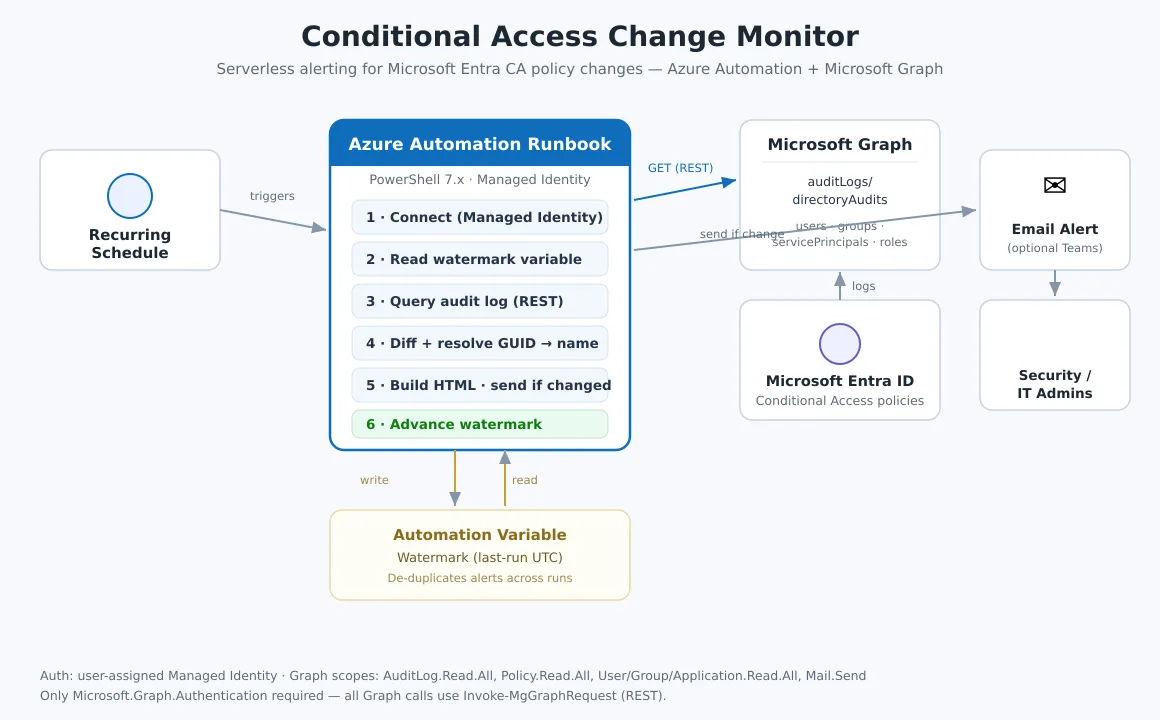
End-to-end flow: schedule → runbook → Microsoft Graph → email, with a watermark variable preventing duplicate alerts.
What it does
- Polls the Microsoft Entra directory audit log for Conditional Access add/update/delete events.
- Identifies who made the change (user UPN or the service principal/app).
- Produces a field-level diff — only the keys that actually changed (e.g.
state: disabled → enabled), not a wall of JSON. - Resolves GUIDs to friendly names (users, groups, apps, roles, named locations) so the diff is readable.
- Emails the security team — and only when there’s a real change to report.
Why this design
- Serverless & cheap. An Azure Automation runbook on a recurring schedule. No VM, no always-on compute.
- No secrets. Authenticates with a user-assigned managed identity — nothing to rotate or leak.
- One module only. Every Graph call uses
Invoke-MgGraphRequest(REST), so you only needMicrosoft.Graph.Authenticationin your runtime — not the heavier Reports/Users/Groups sub-modules. - No duplicate alerts. A watermark (last-run timestamp) stored in an Automation Variable makes any cadence — hourly, every 4h, daily — safe.
- No empty alerts. Service-generated or detail-less audit records are filtered out, so you never get a blank “something changed” email.
Prerequisites
-
User-assigned managed identity attached to the Automation Account, granted these Microsoft Graph application permissions:
AuditLog.Read.All— read the directory audit logPolicy.Read.All— read CA policy + named location detailUser.Read.All,Group.Read.All,Application.Read.All— resolve GUIDs to namesMail.Send— send the alert from a sender mailbox
-
PowerShell 7.x runtime with
Microsoft.Graph.Authenticationimported. -
An Automation Variable (e.g.
CAWatch_LastRunUtc, type String) seeded with an ISO UTC timestamp to hold the watermark.
How it works, step by step
- Connect to Graph with the managed identity (
Connect-MgGraph -Identity). - Read the watermark — the last time the runbook ran. On first run it falls back to a short lookback window.
- Query the audit log via REST:
GET /auditLogs/directoryAudits?$filter=loggedByService eq 'Conditional Access' and activityDateTime ge <watermark>. - Filter to genuine policy events, then for each one compute the old → new diff and resolve any GUIDs to display names.
- Build an HTML summary and send it — only if at least one real change exists.
- Advance the watermark so the next run starts exactly where this one ended.
Retention note: the directory audit log is retained ~30 days by default, so keep your schedule well inside that window (hourly or daily both work great).
The full runbook
Replace every <PLACEHOLDER> value in the param() block, import as a PowerShell 7.x runbook, and link a schedule.
<#
==============================================================================
Runbook : Watch-ConditionalAccessChanges
Purpose : Email alert whenever a Conditional Access policy is added / updated /
deleted in your Entra tenant. Includes WHO made the change and a
readable field-level diff (only changed keys, GUIDs -> friendly names).
Platform: Azure Automation runbook, PowerShell 7.x
Auth : User-assigned Managed Identity (no secrets to rotate)
Times : All timestamps rendered in a configurable time zone (default UTC).
DESIGN NOTES
* Uses ONLY Microsoft.Graph.Authentication. Every Graph call goes through
Invoke-MgGraphRequest (REST) - including sending the email via sendMail -
so you do NOT need the heavier Graph sub-modules.
* A watermark stored in an Automation Variable makes any polling cadence
safe (no duplicate alerts). Email is sent ONLY when a genuine policy
change is found.
* Strict mode is intentionally OFF: Graph JSON omits optional properties,
and a null-safe Get-Prop helper is used throughout instead.
PREREQUISITES
1. A user-assigned Managed Identity attached to the Automation Account,
granted these Microsoft Graph APPLICATION permissions:
AuditLog.Read.All, Policy.Read.All,
User.Read.All, Group.Read.All, Application.Read.All, Mail.Send
2. A sender mailbox the identity may send as (Mail.Send). The email
function below is fully self-contained (inline Graph sendMail).
3. An Automation Variable to hold the watermark (see $WatermarkVariable).
CONFIGURE ME (replace all <PLACEHOLDER> values)
==============================================================================
#>
param(
[string]$ClientId = "<MANAGED_IDENTITY_CLIENT_ID>",
[string]$SenderEmail = "<[email protected]>",
[string]$RecipientEmails = "<[email protected]>",
[string]$AutomationAccountName = "<your-automation-account>",
# Time zone for displayed timestamps. Examples:
# "UTC", "America/Phoenix", "America/New_York", "Europe/London"
# (On Windows hosts, use IDs like "US Mountain Standard Time".)
[string]$DisplayTimeZone = "UTC",
[string]$TimeZoneLabel = "UTC",
[int]$FallbackLookbackMinutes = 70,
[string]$WatermarkVariable = "CAWatch_LastRunUtc"
)
$ErrorActionPreference = "Stop"
# NOTE: Set-StrictMode intentionally NOT enabled - Graph JSON omits optional
# properties, and strict mode throws on missing props. Get-Prop stays defensive.
$GraphBase = "https://graph.microsoft.com/v1.0"
Add-Type -AssemblyName System.Web -ErrorAction SilentlyContinue
# =============================================================================
# HELPERS
# =============================================================================
$script:IdNameCache = @{}
# Resolve the display time zone once (IANA first, then Windows ID, then UTC).
$script:DisplayTz = $null
foreach ($tzId in @($DisplayTimeZone)) {
try { $script:DisplayTz = [System.TimeZoneInfo]::FindSystemTimeZoneById($tzId); break } catch { }
}
function ConvertTo-LocalDisplay {
param([datetime]$Utc, [string]$Format = "yyyy-MM-dd HH:mm:ss")
$u = $Utc.ToUniversalTime()
if ($script:DisplayTz) {
$local = [System.TimeZoneInfo]::ConvertTimeFromUtc($u, $script:DisplayTz)
} else {
$local = $u
}
return ("{0} {1}" -f $local.ToString($Format), $TimeZoneLabel)
}
# -----------------------------------------------------------------------------
# Send an HTML email via Microsoft Graph sendMail (REST, no extra modules).
# Requires Mail.Send granted to the managed identity for the sender mailbox.
# -----------------------------------------------------------------------------
function Send-NotificationEmail {
param(
[Parameter(Mandatory)][string]$SenderEmail,
[Parameter(Mandatory)][string]$RecipientEmails, # comma-separated
[Parameter(Mandatory)][string]$Subject,
[Parameter(Mandatory)][string]$HtmlBody
)
# Build the toRecipients array (works for one OR many addresses).
$toList = @(
($RecipientEmails -split ',' | ForEach-Object { $_.Trim() } | Where-Object { $_ }) |
ForEach-Object { @{ emailAddress = @{ address = $_ } } }
)
$payload = @{
message = @{
subject = $Subject
body = @{ contentType = 'HTML'; content = $HtmlBody }
toRecipients = $toList
}
saveToSentItems = $false
}
Invoke-MgGraphRequest -Method POST `
-Uri "$GraphBase/users/$SenderEmail/sendMail" `
-Body ($payload | ConvertTo-Json -Depth 10) `
-ContentType 'application/json' `
-ErrorAction Stop
}
# -----------------------------------------------------------------------------
# Well-known Entra built-in role TEMPLATE IDs (constant across ALL tenants).
# Public, tenant-agnostic identifiers - safe to hard-code. Lets the diff
# resolve role references instantly without a Graph call.
# -----------------------------------------------------------------------------
$script:BuiltInRoleTemplates = @{
"62e90394-69f5-4237-9190-012177145e10" = "Global Administrator"
"e8611ab8-c189-46e8-94e1-60213ab1f814" = "Privileged Role Administrator"
"194ae4cb-b126-40b2-bd5b-6091b380977d" = "Security Administrator"
"5f2222b1-57c3-48ba-8ad5-d4759f1fde6f" = "Security Operator"
"5d6b6bb7-de71-4623-b4af-96380a352509" = "Security Reader"
"b1be1c3e-b65d-4f19-8427-f6fa0d97feb9" = "Conditional Access Administrator"
"29232cdf-9323-42fd-ade2-1d097af3e4de" = "Exchange Administrator"
"f28a1f50-f6e7-4571-818b-6a12f2af6b6c" = "SharePoint Administrator"
"729827e3-9c14-49f7-bb1b-9608f156bbb8" = "Helpdesk Administrator"
"fe930be7-5e62-47db-91af-98c3a49a38b1" = "User Administrator"
"9b895d92-2cd3-44c7-9d02-a6ac2d5ea5c3" = "Application Administrator"
"158c047a-c907-4556-b7ef-446551a6b5f7" = "Cloud Application Administrator"
"966707d0-3269-4727-9be2-8c3a10f19b9d" = "Password Administrator"
"7be44c8a-adaf-4e2a-84d6-ab2649e08a13" = "Privileged Authentication Administrator"
"c4e39bd9-1100-46d3-8c65-fb160da0071f" = "Authentication Administrator"
"f2ef992c-3afb-46b9-b7cf-a126ee74c451" = "Global Reader"
"17315797-102d-40b4-93e0-432062caca18" = "Compliance Administrator"
"3a2c62db-5318-420d-8d74-23affee5d9d5" = "Intune Administrator"
"9360feb5-f418-4baa-8175-e2a00bac4301" = "Directory Writers"
"88d8e3e3-8f55-4a1e-953a-9b9898b8876b" = "Directory Readers"
}
# -----------------------------------------------------------------------------
function Get-Prop {
param($Obj, [string]$Name)
if ($null -eq $Obj) { return $null }
if ($Obj -is [System.Collections.IDictionary]) {
if ($Obj.Contains($Name)) { return $Obj[$Name] } else { return $null }
}
$p = $Obj.PSObject.Properties[$Name]
if ($p) { return $p.Value } else { return $null }
}
# -----------------------------------------------------------------------------
function Invoke-GraphGet {
param([string]$Uri)
$items = New-Object System.Collections.Generic.List[object]
$next = $Uri
do {
$resp = Invoke-MgGraphRequest -Method GET -Uri $next -OutputType PSObject -ErrorAction Stop
$valueSet = Get-Prop $resp 'value'
if ($null -ne $valueSet) {
foreach ($item in $valueSet) { $items.Add($item) }
$next = Get-Prop $resp '@odata.nextLink'
} else {
$items.Add($resp)
$next = $null
}
} while ($next)
return $items
}
# -----------------------------------------------------------------------------
function Get-JsonDiff {
param([string]$OldJson, [string]$NewJson)
function ConvertTo-Obj([string]$json) {
if ([string]::IsNullOrWhiteSpace($json)) { return $null }
try { return $json | ConvertFrom-Json -ErrorAction Stop }
catch { return $json }
}
$oldObj = ConvertTo-Obj $OldJson
$newObj = ConvertTo-Obj $NewJson
$results = New-Object System.Collections.Generic.List[object]
function Compare-Node($old, $new, [string]$path) {
$oldIsObj = ($old -is [PSCustomObject]) -or ($old -is [System.Collections.IDictionary])
$newIsObj = ($new -is [PSCustomObject]) -or ($new -is [System.Collections.IDictionary])
if ($oldIsObj -or $newIsObj) {
$keys = New-Object System.Collections.Generic.List[string]
if ($oldIsObj) {
if ($old -is [System.Collections.IDictionary]) { $old.Keys | ForEach-Object { $keys.Add("$_") } }
else { $old.PSObject.Properties.Name | ForEach-Object { $keys.Add($_) } }
}
if ($newIsObj) {
if ($new -is [System.Collections.IDictionary]) { $new.Keys | ForEach-Object { $keys.Add("$_") } }
else { $new.PSObject.Properties.Name | ForEach-Object { $keys.Add($_) } }
}
foreach ($k in ($keys | Select-Object -Unique)) {
$childPath = if ($path) { "$path.$k" } else { $k }
Compare-Node (Get-Prop $old $k) (Get-Prop $new $k) $childPath
}
return
}
$oStr = if ($null -eq $old) { $null } elseif ($old -is [Array]) { ($old | Sort-Object) -join ", " } else { "$old" }
$nStr = if ($null -eq $new) { $null } elseif ($new -is [Array]) { ($new | Sort-Object) -join ", " } else { "$new" }
if ($oStr -ne $nStr) {
$type = if ([string]::IsNullOrEmpty($oStr)) { "Added" }
elseif ([string]::IsNullOrEmpty($nStr)) { "Removed" }
else { "Modified" }
$results.Add([PSCustomObject]@{ Path = $path; ChangeType = $type; Old = $oStr; New = $nStr })
}
}
Compare-Node $oldObj $newObj ""
return $results
}
# -----------------------------------------------------------------------------
function Resolve-GraphId {
param([string]$Id)
if ([string]::IsNullOrWhiteSpace($Id)) { return $Id }
$guid = [guid]::Empty
if (-not [guid]::TryParse($Id, [ref]$guid)) { return $Id }
if ($script:IdNameCache.ContainsKey($Id)) { return $script:IdNameCache[$Id] }
if ($script:BuiltInRoleTemplates.ContainsKey($Id)) {
$name = "$($script:BuiltInRoleTemplates[$Id]) (role)"
$script:IdNameCache[$Id] = $name
return $name
}
$name = $null
$lookups = @(
@{ Uri = "$GraphBase/users/$Id`?`$select=displayName,userPrincipalName" ; Fmt = { param($o) "$(Get-Prop $o 'displayName') [$(Get-Prop $o 'userPrincipalName')]" } },
@{ Uri = "$GraphBase/groups/$Id`?`$select=displayName" ; Fmt = { param($o) "$(Get-Prop $o 'displayName') (group)" } },
@{ Uri = "$GraphBase/servicePrincipals(appId='$Id')`?`$select=displayName"; Fmt = { param($o) "$(Get-Prop $o 'displayName') (app)" } },
@{ Uri = "$GraphBase/directoryRoleTemplates/$Id`?`$select=displayName" ; Fmt = { param($o) "$(Get-Prop $o 'displayName') (role)" } },
@{ Uri = "$GraphBase/identity/conditionalAccess/namedLocations/$Id" ; Fmt = { param($o) "$(Get-Prop $o 'displayName') (location)" } }
)
foreach ($l in $lookups) {
try {
$obj = Invoke-MgGraphRequest -Method GET -Uri $l.Uri -OutputType PSObject -ErrorAction Stop
if ($obj -and (Get-Prop $obj 'displayName')) { $name = & $l.Fmt $obj; break }
} catch { }
}
if ([string]::IsNullOrWhiteSpace($name)) { $name = $Id }
$script:IdNameCache[$Id] = $name
return $name
}
# -----------------------------------------------------------------------------
function Resolve-GuidsInText {
param([string]$Text)
if ([string]::IsNullOrWhiteSpace($Text)) { return $Text }
$guidRegex = '[0-9a-fA-F]{8}-([0-9a-fA-F]{4}-){3}[0-9a-fA-F]{12}'
return [regex]::Replace($Text, $guidRegex, { param($m) Resolve-GraphId $m.Value })
}
# =============================================================================
# MAIN
# =============================================================================
Write-Output "[STEP] Connecting to Microsoft Graph via managed identity"
Connect-MgGraph -Identity -ClientId $ClientId -NoWelcome
# ── Lookback window (watermark) ──────────────────────────────────────────────
$nowUtc = (Get-Date).ToUniversalTime()
$lastRunRaw = $null
try { $lastRunRaw = Get-AutomationVariable -Name $WatermarkVariable } catch { }
if ([string]::IsNullOrWhiteSpace($lastRunRaw)) {
$startTime = $nowUtc.AddMinutes(-$FallbackLookbackMinutes)
Write-Output "[INFO] No watermark; fallback lookback of $FallbackLookbackMinutes min"
} else {
$startTime = [datetime]::Parse($lastRunRaw).ToUniversalTime()
Write-Output "[INFO] Watermark found; checking changes since $(ConvertTo-LocalDisplay $startTime)"
}
$startStr = $startTime.ToString("yyyy-MM-ddTHH:mm:ssZ")
# ── Query the directory audit log for Conditional Access changes ─────────────
$filter = "loggedByService eq 'Conditional Access' and activityDateTime ge $startStr"
Write-Output "[STEP] Querying directory audit logs: $filter"
$encodedFilter = [uri]::EscapeDataString($filter)
$auditUri = "$GraphBase/auditLogs/directoryAudits`?`$filter=$encodedFilter&`$top=100"
$logs = Invoke-GraphGet -Uri $auditUri
# ── Keep only GENUINE policy change events ──────────────────────────────────
$logs = $logs | Where-Object {
$act = "$(Get-Prop $_ 'activityDisplayName')"
$tgt = @(Get-Prop $_ 'targetResources')
($act -match 'conditional access policy') -or
($act -match 'policy' -and $tgt.Count -gt 0)
} | Sort-Object { Get-Prop $_ 'activityDateTime' }
if (-not $logs -or $logs.Count -eq 0) {
Write-Output "[DONE] No Conditional Access policy changes since $startStr - no email sent."
Set-AutomationVariable -Name $WatermarkVariable -Value $nowUtc.ToString("o")
Disconnect-MgGraph | Out-Null
return
}
# ── Shape results + build field-level diff ──────────────────────────────────
$changes = foreach ($log in $logs) {
$target = @(Get-Prop $log 'targetResources') | Select-Object -First 1
$initiatedBy = Get-Prop $log 'initiatedBy'
$initUser = Get-Prop $initiatedBy 'user'
$initApp = Get-Prop $initiatedBy 'app'
$policyName = Get-Prop $target 'displayName'
$actor = Get-Prop $initUser 'userPrincipalName'
if ([string]::IsNullOrWhiteSpace($actor)) { $actor = Get-Prop $initApp 'displayName' }
$modDetails = foreach ($mp in @(Get-Prop $target 'modifiedProperties')) {
$diffs = Get-JsonDiff -OldJson (Get-Prop $mp 'oldValue') -NewJson (Get-Prop $mp 'newValue')
foreach ($d in $diffs) {
[PSCustomObject]@{
Field = Get-Prop $mp 'displayName'; Path = $d.Path
ChangeType = $d.ChangeType
OldValue = Resolve-GuidsInText $d.Old
NewValue = Resolve-GuidsInText $d.New
}
}
}
$activityDt = Get-Prop $log 'activityDateTime'
[PSCustomObject]@{
TimeLocal = if ($activityDt) { ConvertTo-LocalDisplay ([datetime]$activityDt) } else { "" }
Activity = Get-Prop $log 'activityDisplayName'
Policy = $policyName
PolicyId = Get-Prop $target 'id'
ChangedBy = $actor
ActorId = Get-Prop $initUser 'id'
Result = Get-Prop $log 'result'
ResultReason = Get-Prop $log 'resultReason'
IPAddress = Get-Prop $initUser 'ipAddress'
CorrelationId = Get-Prop $log 'correlationId'
Modified = $modDetails
}
}
# ── Safety guard: drop any change with no usable content ─────────────────────
$changes = @($changes | Where-Object {
(-not [string]::IsNullOrWhiteSpace($_.Activity)) -or
(-not [string]::IsNullOrWhiteSpace($_.Policy)) -or
($_.Modified -and @($_.Modified).Count -gt 0)
})
if ($changes.Count -eq 0) {
Write-Output "[DONE] Only empty/non-policy records found - no email sent."
Set-AutomationVariable -Name $WatermarkVariable -Value $nowUtc.ToString("o")
Disconnect-MgGraph | Out-Null
return
}
Write-Output "[INFO] $($changes.Count) Conditional Access change(s) detected"
# ── Build HTML body ──────────────────────────────────────────────────────────
$blocks = foreach ($c in $changes) {
$modHtml = ($c.Modified | ForEach-Object {
$badge = switch ($_.ChangeType) {
"Added" { "background:#dff6dd;color:#107c10" }
"Removed" { "background:#fde7e9;color:#a4262c" }
"Modified" { "background:#fff4ce;color:#815300" }
}
@"
<tr>
<td style='vertical-align:top;font-family:Consolas,monospace'>$([System.Web.HttpUtility]::HtmlEncode($_.Path))</td>
<td><span style='padding:2px 6px;border-radius:3px;$badge'>$($_.ChangeType)</span></td>
<td style='color:#a4262c;white-space:pre-wrap'>$([System.Web.HttpUtility]::HtmlEncode($_.OldValue))</td>
<td style='color:#107c10;white-space:pre-wrap'>$([System.Web.HttpUtility]::HtmlEncode($_.NewValue))</td>
</tr>
"@ }) -join "`n"
$modBlock = if ($modHtml) {
@"
<table border='1' cellpadding='4' cellspacing='0' style='border-collapse:collapse;margin:6px 0;width:100%'>
<tr style='background:#f3f2f1'><th>Setting</th><th>Change</th><th>Old</th><th>New</th></tr>
$modHtml
</table>
"@ } else { "<i>No field-level detail captured.</i>" }
@"
<div style='border:1px solid #edebe9;border-radius:6px;padding:12px;margin:10px 0'>
<p style='margin:0 0 6px 0'>
<b>$($c.Activity)</b> — policy <b>$([System.Web.HttpUtility]::HtmlEncode($c.Policy))</b><br>
<span style='color:#605e5c'>By:</span> $([System.Web.HttpUtility]::HtmlEncode($c.ChangedBy))
| <span style='color:#605e5c'>When:</span> $($c.TimeLocal)
| <span style='color:#605e5c'>Result:</span> $($c.Result)
| <span style='color:#605e5c'>IP:</span> $($c.IPAddress)
</p>
$modBlock
<p style='color:#605e5c;font-size:11px;margin:6px 0 0 0'>CorrelationId: $($c.CorrelationId)</p>
</div>
"@
}
$body = @"
<html><body style='font-family:Segoe UI,Arial,sans-serif;font-size:14px;color:#201f1e'>
<h2 style='color:#0F6CBD'>⚠ Conditional Access Policy Change Detected</h2>
<p>The following Conditional Access change(s) were logged in the tenant since
<b>$(ConvertTo-LocalDisplay $startTime)</b> <i>(all times $TimeZoneLabel)</i>:</p>
$($blocks -join "`n")
<p style='color:#605e5c;font-size:12px'>
Source: Microsoft Entra audit logs (loggedByService = 'Conditional Access').<br>
Generated by <b>Watch-ConditionalAccessChanges</b> runbook · $AutomationAccountName ·
$(ConvertTo-LocalDisplay $nowUtc).
</p>
</body></html>
"@
$subject = "Conditional Access Change - $($changes.Count) event(s) [$($changes[0].ChangedBy)]"
# ── Send the alert email (Graph sendMail, REST) ──────────────────────────────
Write-Output "[STEP] Dispatching alert email"
Send-NotificationEmail `
-SenderEmail $SenderEmail `
-RecipientEmails $RecipientEmails `
-Subject $subject `
-HtmlBody $body
# ── Advance watermark + disconnect ───────────────────────────────────────────
Set-AutomationVariable -Name $WatermarkVariable -Value $nowUtc.ToString("o")
Disconnect-MgGraph | Out-Null
Write-Output "[DONE] Watermark advanced to $(ConvertTo-LocalDisplay $nowUtc)"
Extending it
- Teams alerts: post the same summary to a channel or group chat via a Workflows webhook.
- Archive: save each change record to a SharePoint library for an audit trail.
- Time zone: set
-DisplayTimeZone/-TimeZoneLabelto render timestamps in your local zone (e.g.America/New_York). - Deep link: build an Entra portal link from the
CorrelationIdso recipients jump straight to the event.