.Net Framework 4.5.2 SCCM Application Package
I have to say, Microsoft’s .Net framework installation is SOB! so many different settings need to done to get this .net 4.5.2 work in SCCM. Here is how: I downloaded the offline installer from MS website, and run this command line for install:
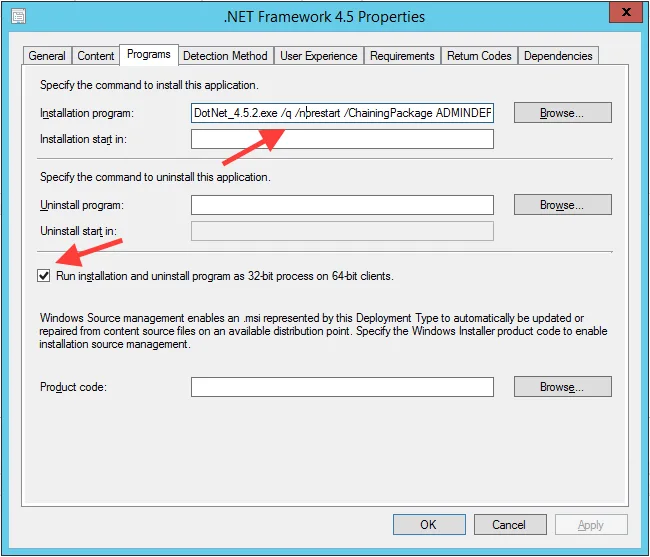
DotNet_4.5.2.exe /q /norestart /ChainingPackage ADMINDEPLOYMENT
In the settings, we need to set Run installation and uninstall program as 32-bit process on 64-bit clients.
 For detection method, we use registry entry:
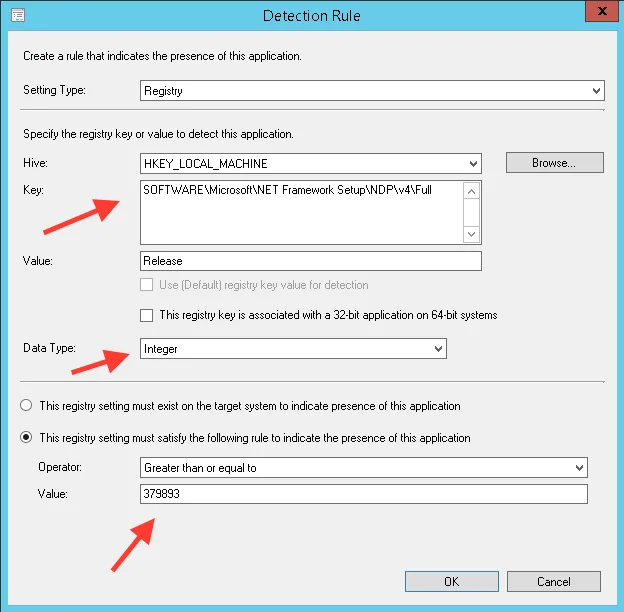 HKEY_LOCAL_MACHINE
SOFTWARE\Microsoft\NET Framework Setup\NDP\v4\Full
Release
value greater than or equal to 379893
Now you are ready to deploy!
HKEY_LOCAL_MACHINE
SOFTWARE\Microsoft\NET Framework Setup\NDP\v4\Full
Release
value greater than or equal to 379893
Now you are ready to deploy!