CCMSETUP Failed with 403, Cannot find DP
 We have an office having issues with SCCM client auto install via group policy.
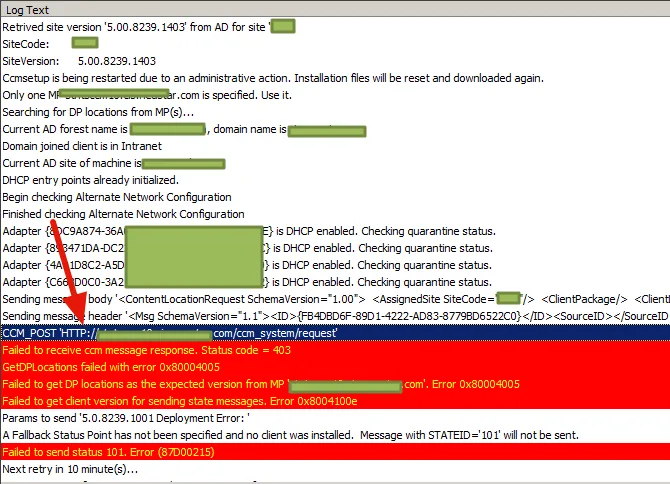
Every time a machine is online, and ccmseutp tried to install the sccm agent, it failed with code 403, cannot find SCCM Distribution points. However the other locations are fine. and I checked all the DPs, boundary groups..seems all good.
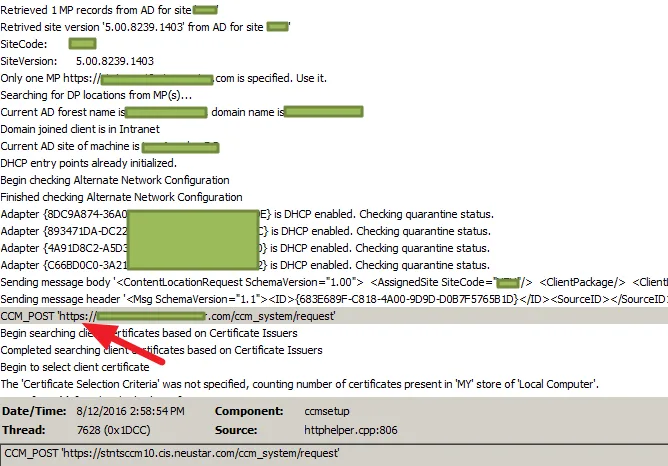
Since the issue came from the CCM_POST ‘HTTP://xxx.com/ccm\_system/request’, I think may from there. so I pasted that link in IE, and I got access denied.
Then I tried these two just to check MP:
https://xxx.com/sms\_mp/.sms\_aut?mpcert
https://xxx.com/sms\_mp/.sms\_aut?mplist
Looks like something wrong with my MP?
I rebooted the SCCM server. no luck…
then went to IIS Manager, and checked the IIS settings..seems all good…
We have an office having issues with SCCM client auto install via group policy.
Every time a machine is online, and ccmseutp tried to install the sccm agent, it failed with code 403, cannot find SCCM Distribution points. However the other locations are fine. and I checked all the DPs, boundary groups..seems all good.
Since the issue came from the CCM_POST ‘HTTP://xxx.com/ccm\_system/request’, I think may from there. so I pasted that link in IE, and I got access denied.
Then I tried these two just to check MP:
https://xxx.com/sms\_mp/.sms\_aut?mpcert
https://xxx.com/sms\_mp/.sms\_aut?mplist
Looks like something wrong with my MP?
I rebooted the SCCM server. no luck…
then went to IIS Manager, and checked the IIS settings..seems all good…
IIS logs: C:\inetpub\logs\LogFiles\W3SVC1
I removed MP and re-install MP…still no good :(
MP logs: MPControl.log , MPsetup.log, MPmsi.log
I tried to specified the ccmsetup commandline to :
ccmsetup.exe /mp:https://mpFQDN SMSSITECODE:XXX
Still not working… Finally, I got a call with Microsoft support, and after 4h troubleshooting…he found out that CCM_POST ‘HTTP://xxx.com/ccm\_system/request’ was using http, however our environment was using https, so it should be sent as CCM_POST ‘HTTPS://xxx.com/ccm\_system/request’… After a few testings, we used the full ccmsetup command line:
ccmsetup.exe /usepkicert ccmhttpsport=443 /mp:https://mpFQDN SMSSITECODE:XXX
PS. It was quite frustrating to see that I cannot find”ccmhttpsport” this switch from internet…LOL And now the issue fixed! Pulling request from https instead of http… A few good readings: http://blog.configmgrftw.com/ccmsetup-mp-and-smsmp/ https://technet.microsoft.com/en-us/library/gg712298.aspx