Automate Hardware OATH Token Provisioning in Entra ID[Updated]
Automating Hardware OATH (FOB) Token Provisioning in Microsoft Entra ID
with Microsoft Forms, Power Automate, SharePoint, Azure Automation & Microsoft Graph
A field-tested build guide — including every bug that bit us and how each one was fixed.
Some users simply cannot use phone-based MFA: offshore contractors on locked-down terminals, call-centre staff, secure areas where phones and USB devices are prohibited. For those populations, hardware OATH-TOTP tokens (“FOBs”) are often the only workable second factor.
Provisioning them by hand does not scale. Each token arrives as an encrypted seed file from the vendor, and each user must be matched to a serial number and registered individually. This guide shows how to automate the whole thing end to end.
Note: every name, domain, ID and link below is a generic placeholder. Replace them with your own environment’s values.
Table of Contents
- What This Solution Does
- Architecture
- Gotcha #1: The Seed Secret Is Encrypted in the XML
- Gotcha #2: Graph Permissions Alone Are Not Enough
- Gotcha #3: Forms No Longer Syncs Excel in the Background
- Prerequisites
- SharePoint Setup
- The Power Automate Flow
- Designing for Real-World Messiness
- PowerShell Traps Worth Knowing
- Retry Policy: One Attempt, Then Ask the User
- Testing & Go-Live
- Troubleshooting Reference
- Security & Compliance Notes
- Lessons Learned
1. What This Solution Does
A user submits their token’s serial number through a Microsoft Form. Power Automate writes that submission to a SharePoint list. A scheduled Azure Automation runbook then:
- matches the serial against a permanent SeedVault of serial → secret pairs
- registers the token in the tenant and binds it to the user via Microsoft Graph
- retires the previous token when the request is flagged as a replacement
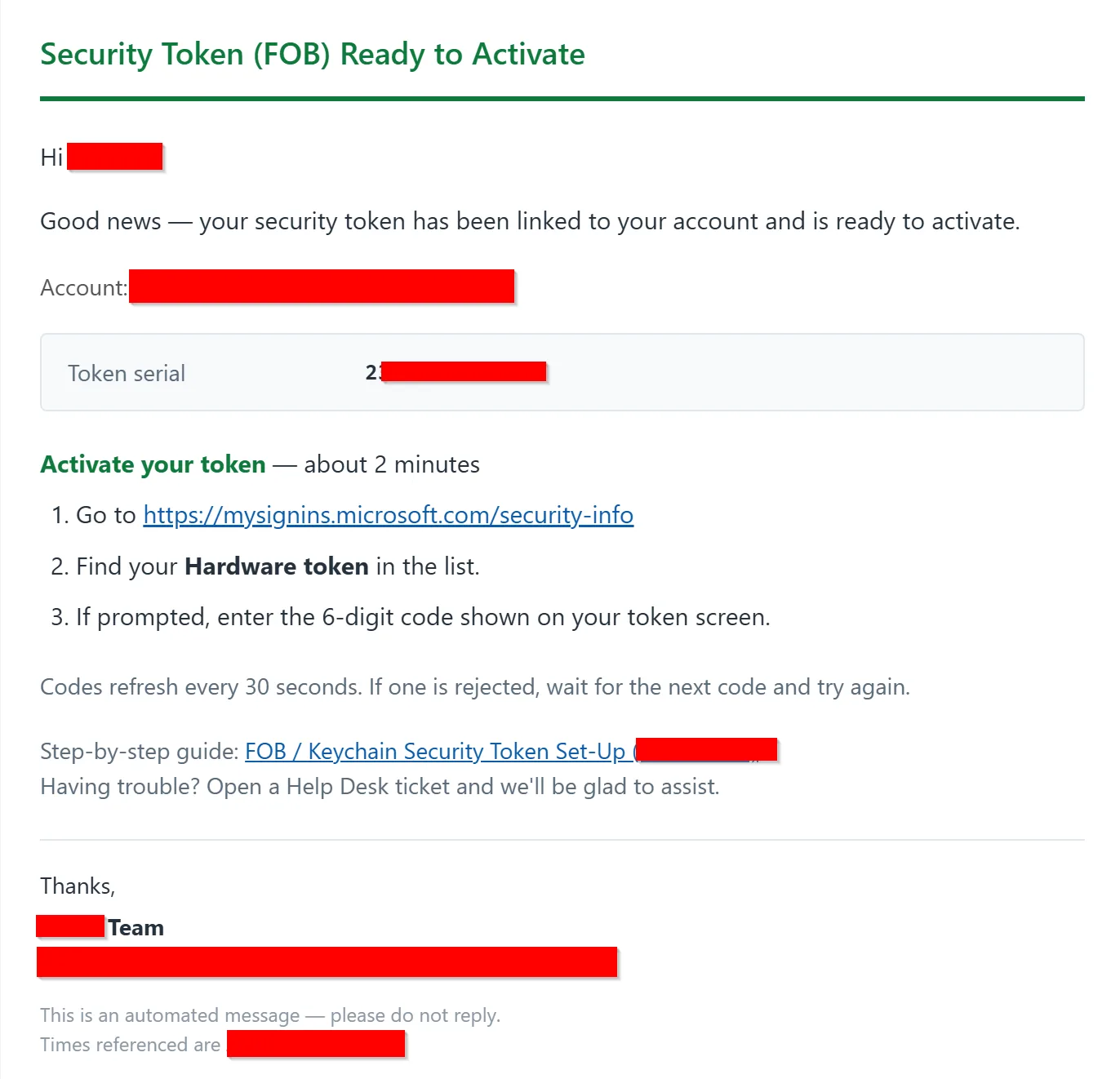
- emails the user activation instructions
- sends administrators a per-run digest with a CSV attachment
New vendor seed batches are ingested automatically from .eml files dropped into a SharePoint folder.
Design principles
- Permanent SeedVault — parse each seed file once, store it durably. New users always match; new batches simply append.
- Idempotent and self-healing — safe to re-run. Stale or orphaned devices are detected and recreated.
- One attempt per request — no silent retry loops. A failure emails the user to resubmit.
- Fail-safe notifications — a systemic outage must never mass-email hundreds of users.
- Least privilege — scoped Graph app roles, a single directory role, and mail sending restricted by policy.
2. Architecture
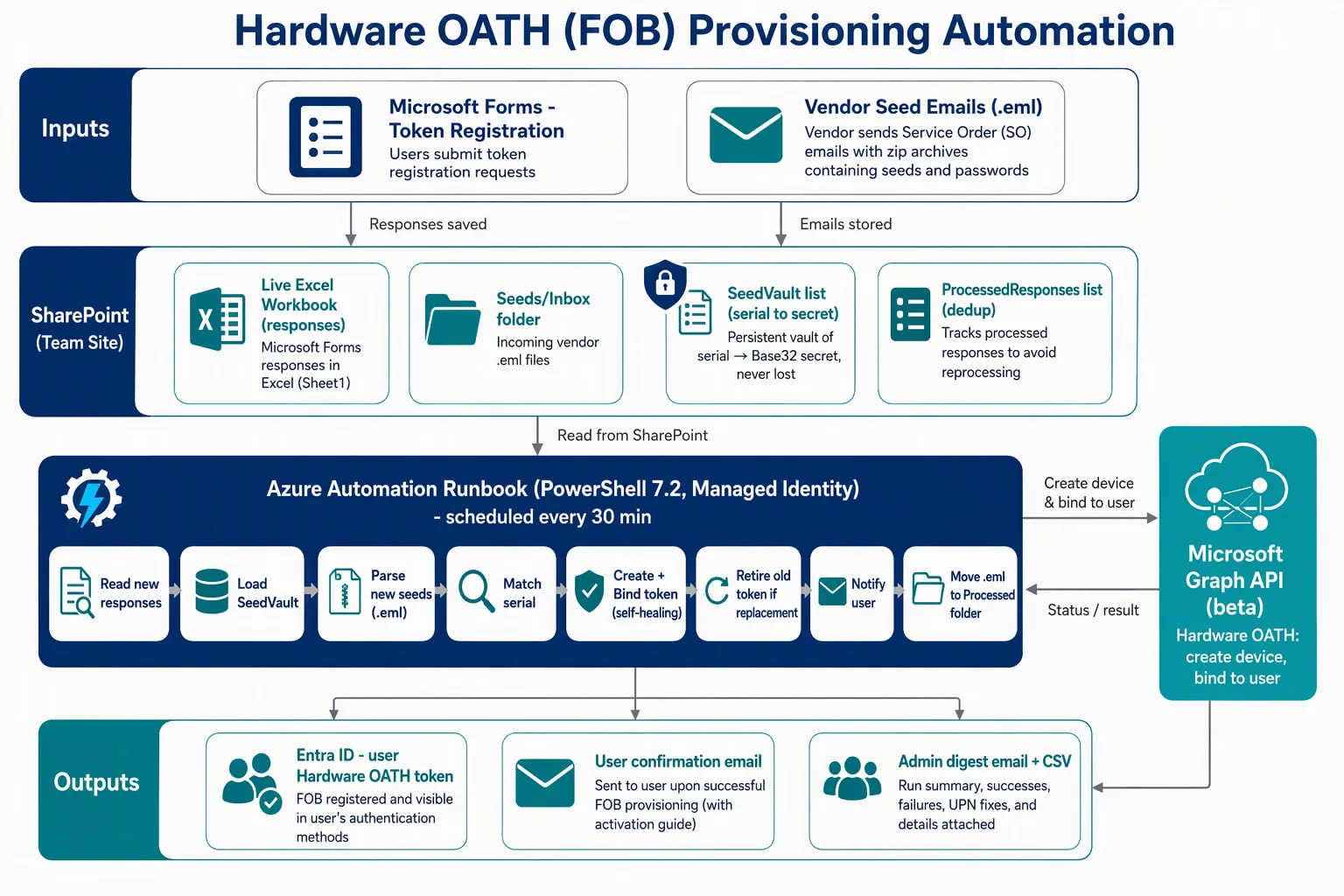
Figure 1 — end-to-end provisioning flow
Components
| Component | Role |
|---|---|
| Microsoft Forms | Intake: serial number, target account, replacement flag |
| Power Automate | Writes one SharePoint list item per submission |
| Requests list | The intake queue the runbook reads |
| Seeds/Inbox folder | Landing area for vendor seed .eml pairs |
| SeedVault list | Permanent serial → Base32 secret store |
| ProcessedResponses list | Dedup and audit record |
| Azure Automation runbook | Scheduled PowerShell 7.2 job using a managed identity |
| Microsoft Graph (beta) | Hardware OATH endpoints: create device, bind to user |
| Entra ID | Where the activated token lives on the user |
Per-run flow
- Connect to Graph with the managed identity
- Load dedup state; skip anything already
RegisteredorFailed - Read pending items from the requests list
- Load the SeedVault; parse any new
.emlseeds and append new serials - For each request: resolve the account, validate the serial, match a seed
- Create the device, wait for replication, bind it to the user
- Retire the old token if this is a replacement
- Email the user; record the outcome
- Send the admin digest
3. Gotcha #1: The Seed Secret Is Encrypted in the XML
Vendor seed archives are password-protected ZIPs — sometimes disguised with a .pdf extension. Inside you typically find three files:
key.bin
seeds.txt
seeds.xml
The obvious move is to parse seeds.xml, since PSKC is the standard format. Do not. Its secret is AES-encrypted:
<Secret>
  <EncryptedValue>
    <EncryptionMethod Algorithm="http://www.w3.org/2001/04/xmlenc#aes128-cbc"/>
    <CipherData><CipherValue>AAAABBBBCCCCDDDDEEEEFFFF...</CipherValue></CipherData>
  </EncryptedValue>
</Secret>
Without the vendor’s decryption key, that value is useless.
seeds.txt contains the same secrets in plaintext Base32, ready to hand straight to Entra:
Serial Number,Base32 Secret
1234567890123,ABCDEFGHIJKLMNOPQRSTUVWXYZ234567
1234567890124,ZYXWVUTSRQPONMLKJIHGFEDCBA765432
How this bug presented
Our first parser walked the XML looking for PlainValue. It found one — but the only unencrypted PlainValue elements are Counter, Time and TimeInterval. So every secret came back as "0", a single character.
Graph rejected every registration with BadRequest, and the cause was completely non-obvious from the error.
Sanity check: a valid Base32 secret for SHA-1 decodes to 20 bytes (32 Base32 characters). If yours doesn’t, you’re reading the wrong field.
4. Gotcha #2: Graph Permissions Alone Are Not Enough
This one cost hours. The documented app permissions were all granted:
| Permission | Purpose |
|---|---|
Policy.ReadWrite.AuthenticationMethod | Create devices in the tenant pool |
UserAuthenticationMethod.ReadWrite.All | Bind a token to a user |
User.Read.All | Resolve users |
Sites.ReadWrite.All | Read/write SharePoint lists |
Mail.Send | Notifications |
Creating the device worked. Binding it to a user returned 403 Forbidden, every time.
The missing piece is a directory role. Writing to another user’s authentication methods is a privileged operation guarded by RBAC on top of the Graph scope:
New-MgRoleManagementDirectoryRoleAssignment -BodyParameter @{
  principalId      = "<managed-identity-object-id>"
  roleDefinitionId = "c4e39bd9-1100-46d3-8c65-fb160da0071f"  # Authentication Administrator
  directoryScopeId = "/"
}
Allow roughly 15 minutes for propagation.
Which role? Authentication Administrator covers non-admin users and is the least-privilege choice. Privileged Authentication Administrator is required to touch admin accounts — but you probably shouldn’t be putting non-phishing-resistant tokens on admin accounts anyway.
5. Gotcha #3: Forms No Longer Syncs Excel in the Background
The original design read responses straight from the live Excel workbook that Forms maintains. It worked — until new submissions stopped appearing.
Microsoft changed the Forms→Excel sync mechanism in November 2024. The workbook now updates only when a human opens it in Excel for the web or desktop. Microsoft’s own guidance is explicit that automation reading that file will not see new responses.
The fix: stop reading the workbook. Put Power Automate between Forms and your automation:
Forms → Power Automate → SharePoint list → runbook
The flow fires on submission and writes a list item immediately. The runbook reads the list. No human interaction required.
This is worth knowing even if you’re building something unrelated — any workflow that reads a Forms-linked workbook via API is affected.
6. Prerequisites
Managed identity — Graph application permissions
The five listed in section 4.
Managed identity — directory role
Authentication Administrator (see section 4).
Scope mail sending
Restrict the identity so it can only send as your service mailbox:
New-ApplicationAccessPolicy -AppId "<mi-app-id>" `
  -PolicyScopeGroupId "<sender-scope-group>@example.com" `
  -AccessRight RestrictAccess -Description "Limit automation sender"
Custom PowerShell modules (runtime 7.2+)
- SharpZipLib — extract password-protected archives
- MimeKit — parse
.emlfiles - Microsoft.Graph.Authentication
- Your own notifications module exposing a
Send-RunbookEmailfunction
Version your modules. More on why in section 10.
7. SharePoint Setup
Folders
Documents/Seeds/Inbox        ← vendor .eml pairs land here
Documents/Seeds/Processed    ← archived after ingestion
Documents/Seeds/Manual       ← optional, for manual imports
Restrict these to your identity team and the managed identity. Seed material is sensitive.
List: SeedVault
| Column | Type | Notes |
|---|---|---|
| Title | Single line | Serial number — enforce unique values |
| Secret | Single line | Base32 secret |
| Interval | Number | 30 |
| HashFunction | Single line | hmacsha1 |
| Manufacturer | Single line | Vendor name |
| Model | Single line | Token model |
| SO | Single line | Source order, for auditing |
| IngestedDate | Date & Time | When added |
List: Requests (intake queue)
| Column | Type | Notes |
|---|---|---|
| Title | Single line | Forms response Id — enforce unique values |
| RequesterUPN | Single line | The account the token registers to |
| ResponderEmail | Single line | The mailbox to notify |
| SerialNumber | Single line | The submitted serial |
| IsReplacement | Yes/No | Retires the previous token when true |
List: ProcessedResponses (dedup + audit)
| Column | Type |
|---|---|
| Title | Single line — response Id, enforce unique |
| UPN / Serial / Status / RunId | Single line |
| ProcessedDate | Date & Time |
8. The Power Automate Flow
- Trigger: When a new response is submitted (Microsoft Forms)
- Action: Get response details
- Action: Create item in the requests list
Two things that will trip you up
The form must be group-owned. If a form is merely shared with you, the Forms trigger will never fire — silently. Move it into a Microsoft 365 group and make sure you are a member, not just an owner. (Being an owner does not imply membership.)
Yes/No columns hide dynamic content. A SharePoint Yes/No field renders as a fixed dropdown, so the dynamic-content panel appears empty. Click Enter custom value to switch it to a free-text box, then insert the answer or an expression:
if(equals(outputs('Get_response_details')?['body/<question-id>'],'Yes'), true, false)
Insert the answer from the picker first, then wrap it — that way you never have to guess the question ID.
9. Designing for Real-World Messiness
Users type things wrong. Directories are inconsistent. Build for it.
Domain typos
Auto-correct with a Levenshtein distance of ≤ 2 against your real domain, and log every correction:
if ((Get-LevenshteinDistance $domain $TargetDomain) -le 2) {
    return "$local@$TargetDomain"
}
This quietly fixed submissions like [email protected] and [email protected].
Alias-style addresses
Not everyone submits their UPN. Some enter an email alias like [email protected] when their UPN is [email protected]. A direct /users/{upn} lookup returns 404.
Fall back to a filter across mail, userPrincipalName and proxyAddresses:
$filter = "mail eq '$Upn' or userPrincipalName eq '$Upn' or proxyAddresses/any(p:p eq 'smtp:$Upn')"
# requires header ConsistencyLevel: eventual
Privileged accounts with no mailbox
Many organisations issue separate admin accounts (a- or t- prefixes) that are mail-disabled. If a token is registered to one of those, the confirmation email has nowhere to go.
The solution is to separate two concepts that are usually the same:
- Where the token registers → the privileged account
- Where the notification goes → the person’s regular mailbox
Resolution order for the notification address:
- The Forms responder’s email (their real mailbox)
- The privileged UPN with the prefix stripped, verified in the directory
- If neither resolves — register anyway, skip the email, flag it in the digest
Just as important: say so in the email. Otherwise someone receiving it at their everyday mailbox will try to activate on the wrong account.
⚠️ Activation steps must differ too. A privileged user needs to open a private browser window and sign in as that account — otherwise they land on their everyday account’s security page and the token isn’t there.
10. PowerShell Traps Worth Knowing
Several of these cost real debugging time and apply well beyond this project.
Single-element arrays get unrolled
This one was genuinely nasty. A helper that returns a collection will silently degrade when the collection has exactly one item:
$items = Invoke-GraphGetAll $uri   # list has 1 item
$items.Count                        # returns 12 — the number of PROPERTIES
PowerShell unrolled the one-element array to a bare hashtable, and .Count reported its key count. The list looked like it held 12 requests; it held one.
Fix: wrap call sites in @():
$items = @(Invoke-GraphGetAll $uri)
Don’t do both
return ,$itemsand@()at the call site — that creates a nested array and every property read returns the whole collection concatenated. We hit that too.
Graph returns hashtables, not objects
Invoke-MgGraphRequest returns Hashtable. Property-existence checks written for PSObjects silently return nothing:
# Fails for hashtables
if ($f.PSObject.Properties.Name -contains $n) { ... }

# Works for both
if ($f -is [System.Collections.IDictionary]) {
    if ($f.Contains($n)) { $v = $f[$n] }
} else { $v = $f.$n }
Response streams can only be read once
Reading a Graph response stream synchronously after the SDK has already consumed it asynchronously throws. Download to a file instead:
Invoke-MgGraphRequest -Method GET -Uri "$base/items/$id/content" -OutputFilePath $path
Paginate everything
Device lists, list items — all paginated at ~100. Once our device pool passed 100, “is this serial already registered?” started returning false negatives for older serials, which then produced conflicts on create.
[switch] vs [bool] for portal parameters
The Azure portal passes parameter values as strings. A [switch] parameter rejects "True":
param([bool]$WhatIf = $false) # accepts "True" from the portal
SharePoint renames recreated columns
Delete a column and recreate it with the same display name, and SharePoint gives it an internal name of MyColumn1. Graph and Power Automate use the internal name.
This is why our code accepts aliases:
$COLS_UPN = @('RequesterUPN','RequesterUPN1','Email1','UPN')
Tip: the flow’s run output JSON shows the true internal names. Check there when a field mysteriously reads as empty.
Version your modules
An Automation module with no ModuleVersion shows as version 0.0, and re-uploads may be served from cache. Adding a version to the .psd1 and bumping it makes updates reliable:
ModuleVersion = '1.1.0'
Diagnose which build is actually loaded:
$cmd = Get-Command Send-RunbookEmail
$cmd.Source; $cmd.Version
$cmd.Parameters.ContainsKey('BccEmails')
Devices need a moment before binding
A freshly created device isn’t always immediately bindable — the bind returns Conflict. Add a short delay after create, retry with backoff, and verify before retrying (the bind may have actually succeeded despite the error).
11. Retry Policy: One Attempt, Then Ask the User
Our first design classified failures as transient (retry) or permanent (stop). It seemed elegant. In practice it created two problems:
- A systemic issue caused the same requests to retry hourly, forever
- One misconfiguration emailed every pending user a failure notice
We simplified to: each request is attempted exactly once.
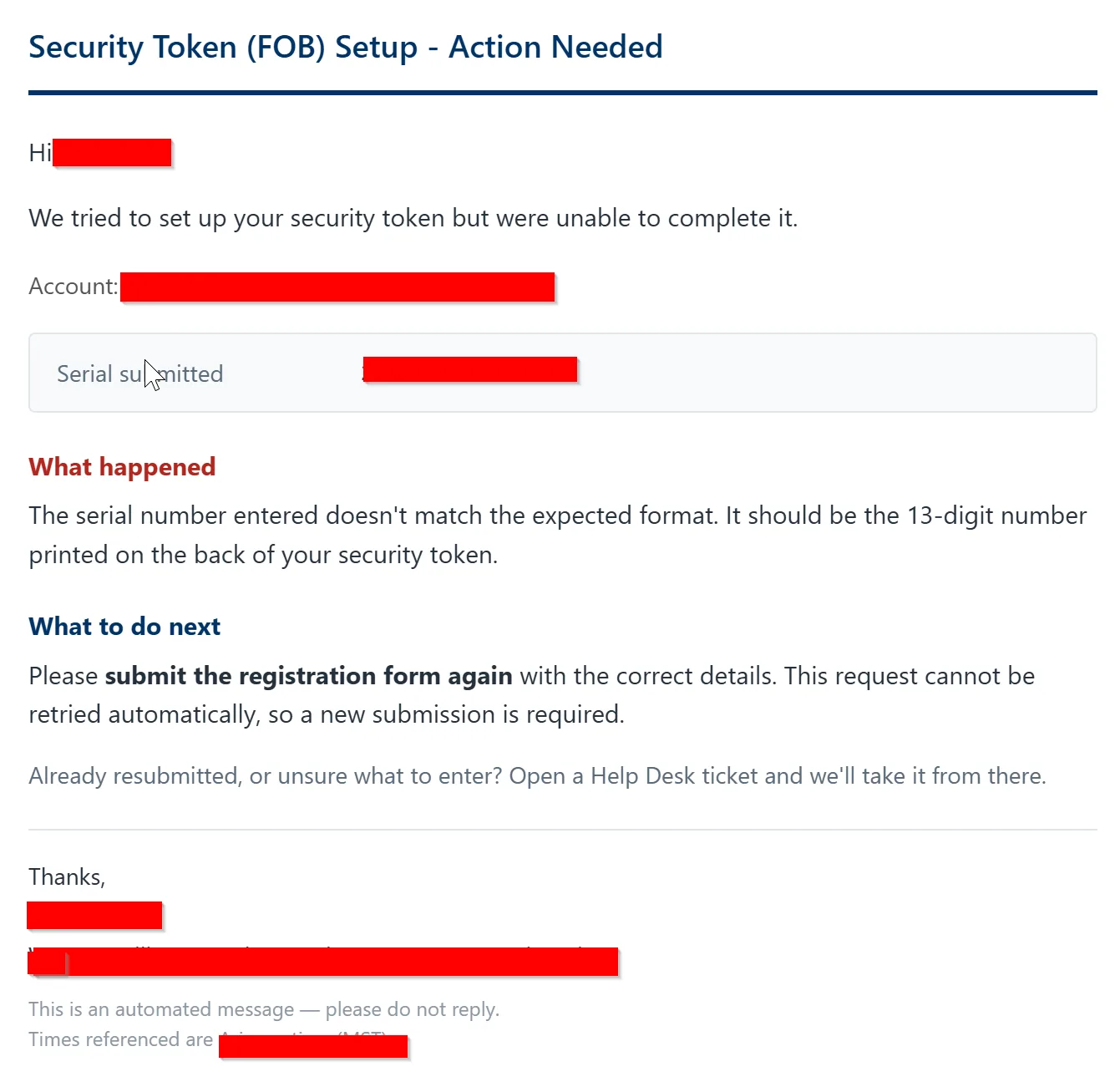
| Outcome | Recorded | User emailed | Retried |
|---|---|---|---|
| Success | Registered | Confirmation | No |
| Failure | Failed | “Please resubmit” | No |
A resubmission arrives as a new response Id and is processed fresh. To requeue something manually, set its status to anything other than Registered/Failed — e.g. Retry.
This is easier to reason about, cannot loop, and puts a human in the loop exactly once.
Trade-off, stated plainly: a request that fails because the seed batch hasn’t been loaded yet will not self-heal when it arrives. Load seed files before directing users to the form.
12. Testing & Go-Live
| Step | Action | Expected |
|---|---|---|
| 1 | Run with WhatIf = true | Reads everything, writes nothing |
| 2 | Run live with a small batch limit | One or two users registered and emailed |
| 3 | Verify in Entra | User ▸ Authentication methods shows the hardware token |
| 4 | Full run | Remaining users provisioned, digest sent |
| 5 | Schedule | Every 30 minutes |
A -MaxUsers parameter for step 2 is well worth building — it turns a nervous first run into a controlled one.
13. Troubleshooting Reference
| Symptom | Cause | Fix |
|---|---|---|
Secret parses as "0" or one character | Read the encrypted XML | Parse seeds.txt instead |
BadRequest on create | Malformed secret | Confirm Base32 decodes to 20 bytes |
403 Forbidden on bind | Missing directory role | Assign Authentication Administrator |
Conflict on bind | Replication timing, or a stale device | Add post-create delay + retry; delete orphaned devices |
Conflict writing to a list | Duplicate unique-column value | Use PATCH-or-create instead of blind POST |
| Item count wrong (e.g. “12” for one row) | Single-element array unrolled | Wrap call sites in @() |
| Fields read as empty | Hashtable vs PSObject, or renamed column | Hashtable-aware reader; accept column aliases |
| New Forms responses never appear | Forms→Excel background sync removed | Use Power Automate → SharePoint list |
| Forms trigger never fires | Form is shared, not group-owned | Move to a group; ensure you’re a member |
| Module changes have no effect | No ModuleVersion, cached copy | Add and bump the version, re-upload |
| Serial “not found” for a valid token | Seed batch not ingested | Import the archive; check vendor filename pattern |
14. Security & Compliance Notes
- Least privilege — scoped app roles, one directory role, mail sending restricted by application access policy.
- Protect seed material — restrict the seed folder and SeedVault list; delete extracted files from the sandbox after every run. For higher assurance, store secrets in a key vault rather than a list.
- One token, one account — a hardware OATH token must be assigned to a single user. It can be reassigned later, but never shared; sharing destroys the audit trail.
- OATH-TOTP is not phishing-resistant. It is a reasonable compensating control for users who genuinely cannot use anything else. Where FIDO2, passkeys or Windows Hello for Business are viable, prefer them — especially for privileged accounts, which may be blocked outright by a phishing-resistant authentication-strength policy.
- Audit — keep the per-run digest and CSV, plus the dedup list, as your processing record.
15. Lessons Learned
If you take nothing else from this write-up:
- Read the data before writing the parser. Dumping one archive’s contents up front would have saved hours chasing an encrypted field.
- Permissions are not just permissions. Graph scopes and directory roles are separate systems; privileged writes often need both.
- Test with exactly one record. Most collection bugs only appear at a count of one.
- Never let a systemic failure notify end users. Have a circuit breaker, or a policy that cannot loop.
- Log the resolved values, not just the inputs. Logging which module version loaded, and which address a notification was routed to, turned several mysteries into one-line diagnoses.
Platform behaviour changes underneath you. The Forms→Excel sync change silently broke a working design. Prefer event-driven writes over polling a file.
Some user notification emails:
Built and debugged in production. Every gotcha above is one we actually hit.